Governance & Data Contracts
Layer governance onto the catalog you built — glossary, classification, ownership, data quality — then see how a data contract binds all of it to one dataset, enforceably. This is where your real project lives.
3.1 — The four pillars
Governance in OpenMetadata isn't one feature — it's several layers attached to entities.
These pillars map straight onto DAMA-DMBOK: glossary, ownership and stewardship → Data Governance; classification / PII tags → Data Security; test cases → Data Quality; and the contract ties them together. The full mapping — and where the tool stops and organisation begins — is in the conclusion.
a) Glossary — shared business language
A glossary is a controlled vocabulary of business terms
(Customer, Net Revenue, PII), each with a definition
and owner. Glossary terms attach to tables/columns so business meaning
travels with the data.
Classification/tags answer "what kind of thing is this?" (technical). Glossary terms answer "what does this mean to the business?" (semantic).
Do thisCreate a glossary term
- Govern → Glossary → Add Glossary. Name:
Shop Business Terms. Description (required): "Shared business vocabulary for the online shop." → Save. - Add Term. Name:
Customer Email. Description: "A customer's email address — personal data (PII)." → Save. - Attach it to the
emailcolumn of thecustomerstable.

Customer Email term to the Shop Business Terms glossary.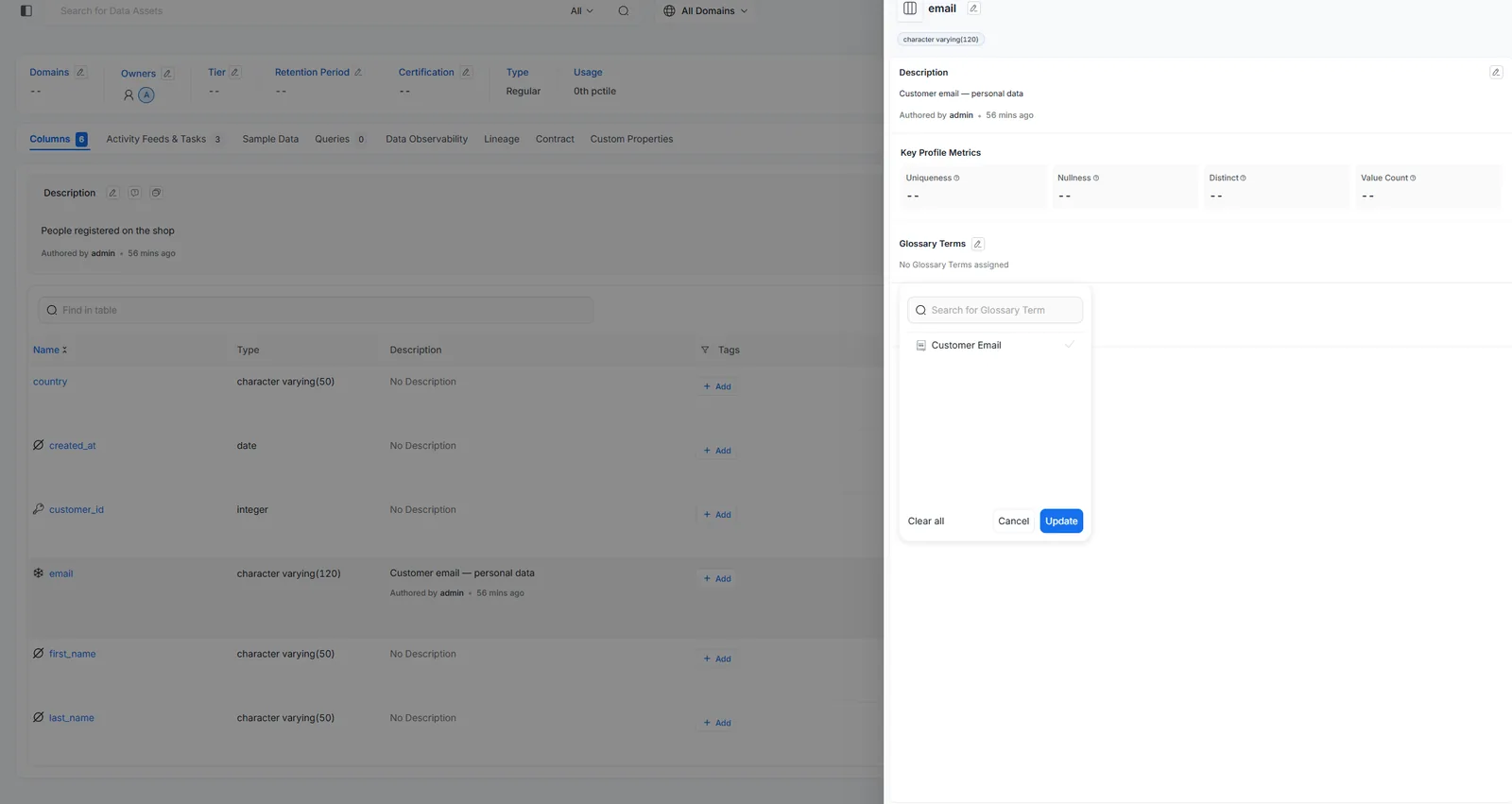
customers.email — the business meaning now travels with the column.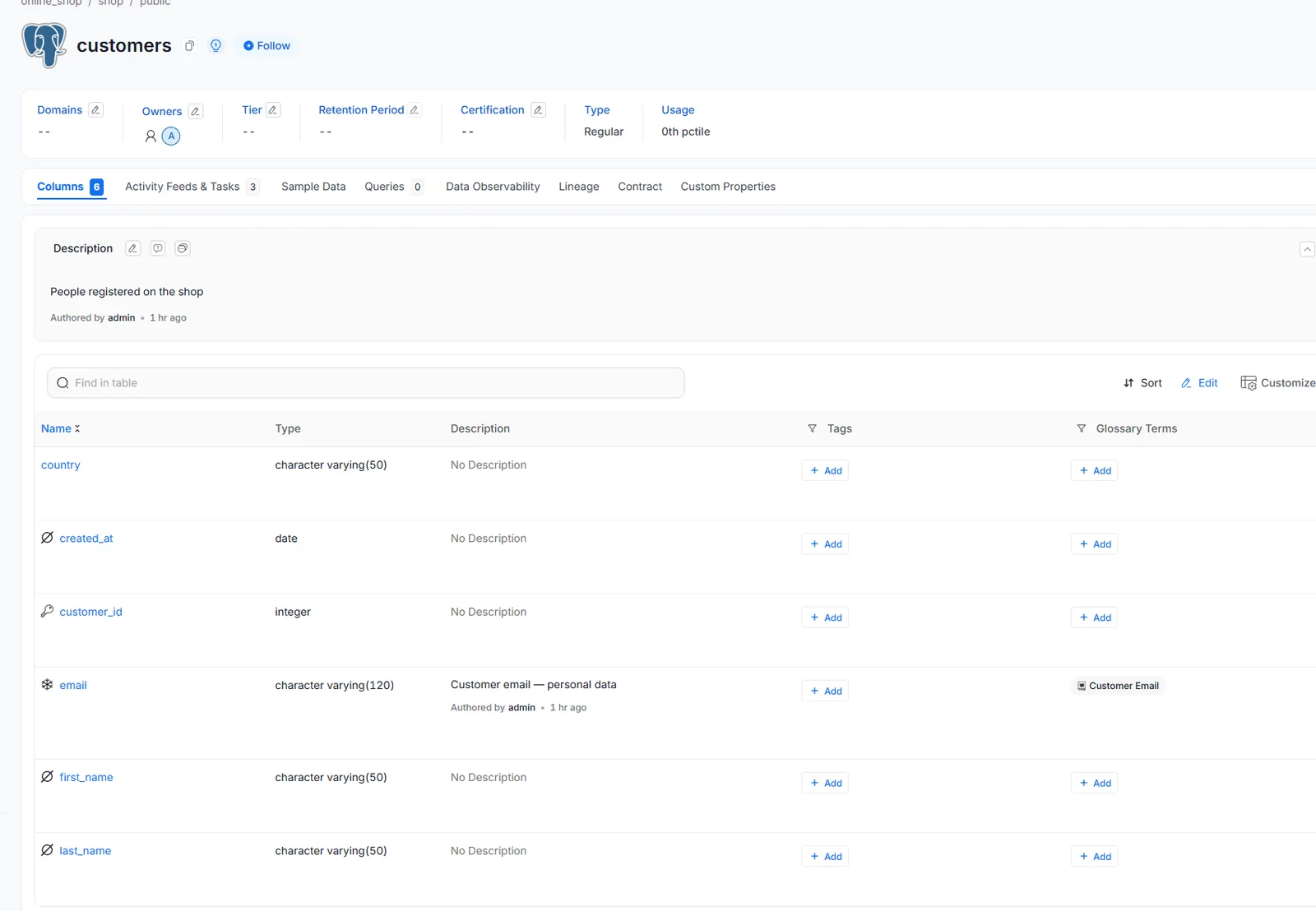
Shop Business Terms.b) Classification & Tags — automatable labels
A classification is a group of tags. OpenMetadata ships with
several, and the exact tag names vary by version. For sensitivity you'll usually
find the PersonalData classification (tags Personal,
SpecialCategory) and a General classification (tags Sensitive /
NonSensitive). Tags drive policy: mark data as sensitive, then build access policies
and contract rules on those tags.
PII.Sensitive? That's normalOlder guides mention a PII.Sensitive tag that may not exist in your version. Use
whatever sensitivity tags your instance offers — commonly Personal and
Sensitive — or create your own (optional exercise below).
Do thisTag the email column as sensitive
- On the
customerstable →emailcolumn → Tags → + Add. - Search and add the sensitivity tags your instance has — typically Personal and Sensitive. Save.
- Note how the tags surface in search and on the entity. (OpenMetadata can also auto-classify PII during profiling.)
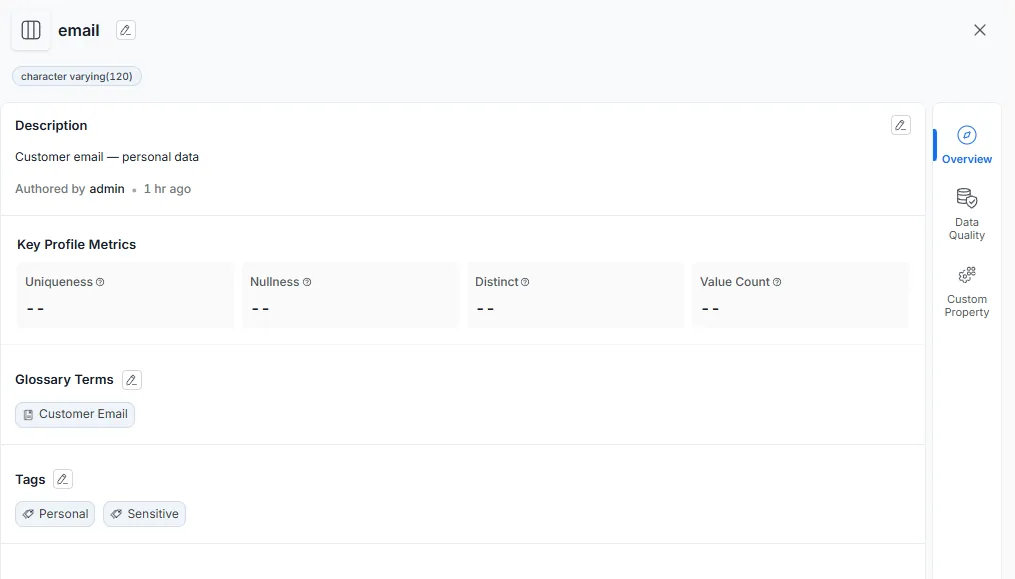
email column, fully governed: a description, the Customer Email glossary term, and the Personal + Sensitive tags.OptionalCreate your own classification & tag
Want a tag that doesn't exist yet? Create one — this is how teams add their own labels.
- Settings → Classifications (or Govern → Classifications) → Add Classification. Name:
Data Sensitivity, description: "How sensitive the data is." → Save. - Inside it, Add Tag: name
PII, description "Personally identifiable information." → Save. - Back on
customers.email→ Tags → + Add → apply your newData Sensitivity.PIItag.
c) Ownership & Tiers — accountability
Every entity should have an owner (team or user) and a tier
(Tier1 = business critical … Tier5 = sandbox). Ownership is who you
escalate to; tier is how much the organization cares. Contracts and SLAs lean on both.
Do thisSet owner & tier
- Set an owner and mark
ordersas Tier1 (it's business-critical). - Filter Explore by
Tier1to see how leadership finds the critical assets.
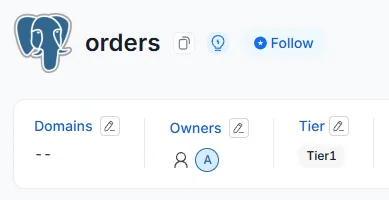
orders table marked Tier1 with an owner — accountability and criticality, set.d) Data Quality — is the data actually good?
Test cases assert expectations on tables/columns (row count > 0, column not null, values in a set, freshness, custom SQL). They run as a workflow and produce pass/fail history. This is the measurable half of a data contract.
Do thisAdd data quality tests
- Open the
orderstable → Data Observability / Data Quality tab → Add Test. - Table Level → select table
orders→ Test Type "Table Row Count To Be Between" (⚠ not Column Count — that counts columns). Min1, Max1000. Name:orders_row_count_between. → Submit. - Add Test again → Column Level → column
total_amount→ Test Type "Column Values To Be Not Null". Name:total_amount_not_null. → Submit. - Defining a test doesn't run it. Go to the Test Suites tab → open the
online_shop.shop.public.orderssuite → Add Pipeline → Deploy → Run (a small agent, like ingestion). - Refresh after ~30s: both tests turn Success (green).
ordershas 7 rows (1–1000 ✓) and no nulltotal_amount✓.
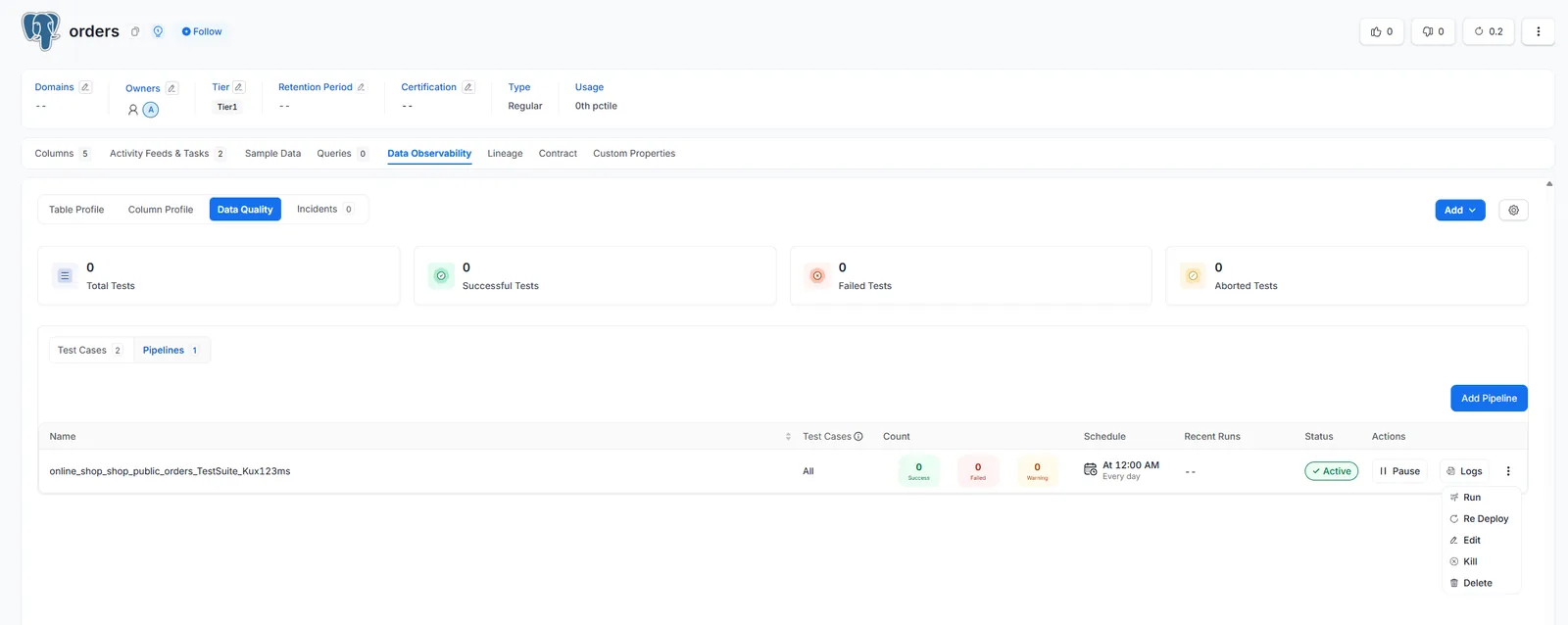
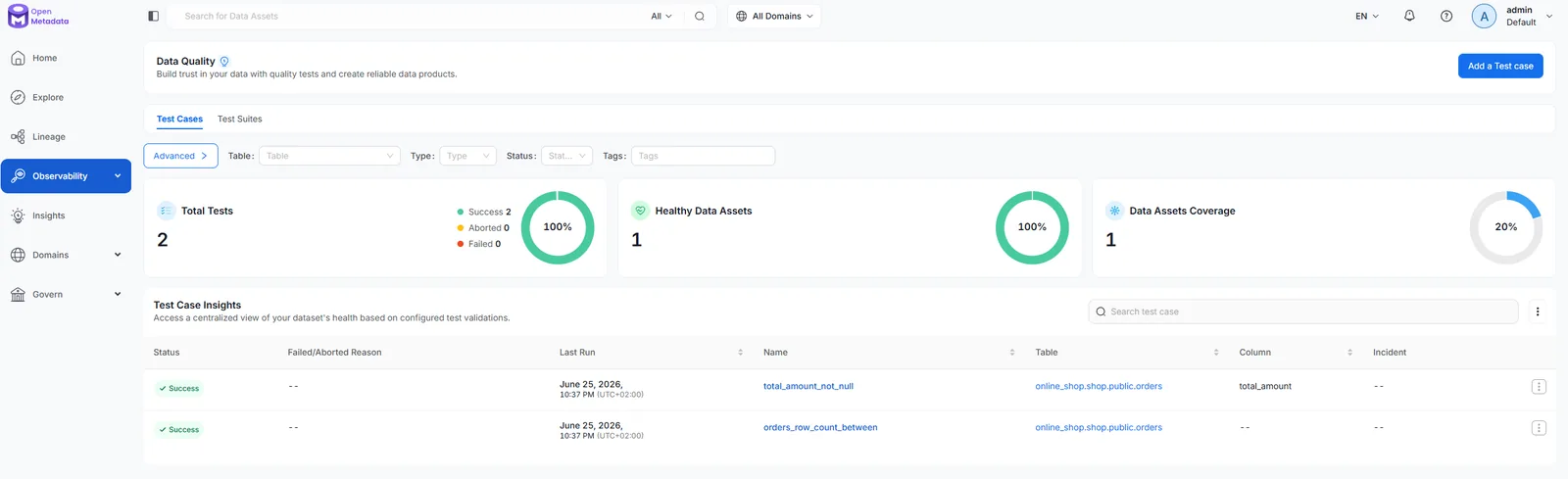
OptionalMake a test fail on purpose
Green is reassuring, but you only trust tests once you've seen one catch a problem. Let's force a failure.
- Add Test → Table Level →
orders→ "Table Row Count To Be Between" → Min100, Max1000. Name:orders_row_count_min_100_FAIL. - Re-run the suite (Test Suites →
orders→ Run). - This test turns Failed (red) —
ordershas only 7 rows, not ≥100 — while the others stay green. The dashboard shows Failed 1. - That red is the point: a failing test is how a contract detects bad data. When done, delete it (⋮ → Delete) to keep the lab healthy.
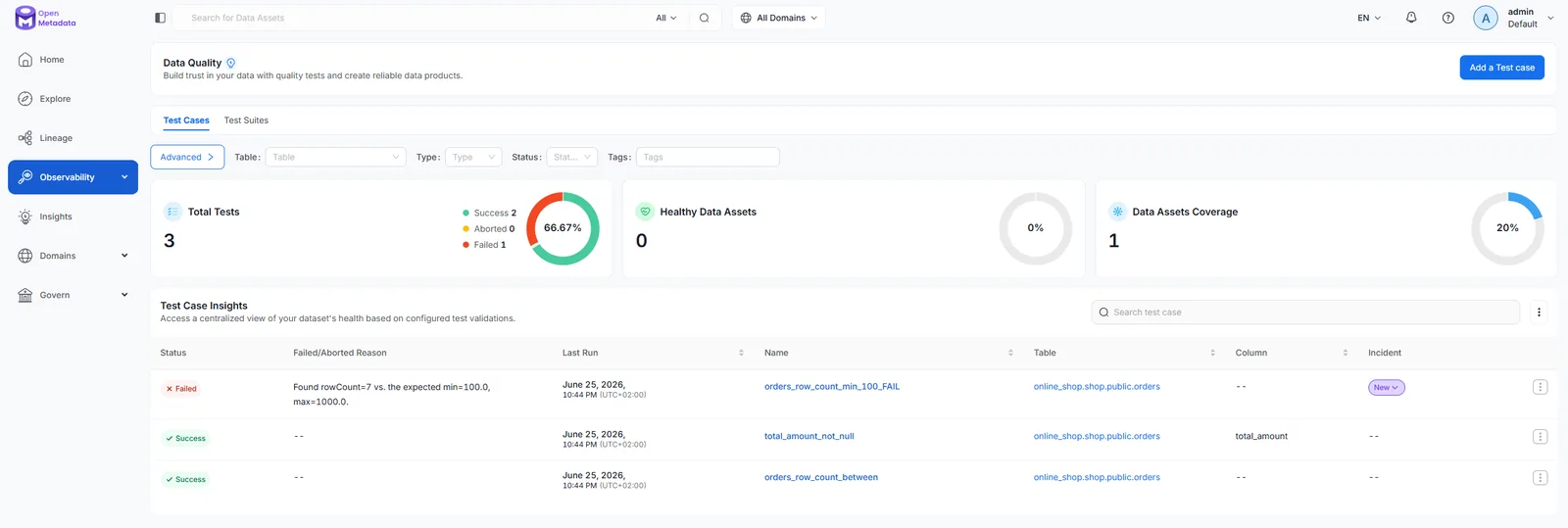
3.2 — Data Contracts: where it all comes together
A data contract is a formal, enforceable agreement about a dataset: its schema, quality guarantees, semantics, owner, and SLAs. It's not a new pillar — it's the binding of all four pillars to one dataset, made machine-checkable:
| Contract element | Comes from |
|---|---|
| Schema the consumer can rely on | Catalog (Lesson 1) |
| Quality guarantees (tests must pass) | Data quality (3.1d) |
| Semantics & classification | Glossary + tags (3.1a/b) |
| Ownership / SLA | Ownership (3.1c) |
| Upstream dependencies | Lineage (Lesson 2) |
OpenMetadata has native Data Contract support: you define a contract on an entity, and it's validated against live metadata + quality results. When the table drifts (schema change, failing test), it's flagged.
The contract builder is a wizard with tabs that map almost one-to-one to ODCS:
Contract Details, Terms of Service, Schema, Semantics, Security, Quality, SLA. You don't have to
fill them all — here's a meaningful minimum for v_daily_revenue.
Do thisAuthor your first data contract
- Open
v_daily_revenue→ Contract tab → Add Contract → Create Contract with UI. (Note the Import ODCS option — OpenMetadata can also load a contract from an open-standard file; more on that below.) - Contract Details: Title
Daily Revenue Contract, set yourself as Owner, description "Guarantees for the daily revenue view." - Schema: tick the three expected columns —
order_date,orders_count,revenue(already detected from the view). - SLA: Refresh Frequency
1 Day, Max Latency2 Hours, Retention1 Year, refresh Columnorder_date. (Semantics / Security / Quality are optional — skip for now.) - Save. Review the contract status. Imagine someone renames
revenueupstream — the contract would flag the violation.
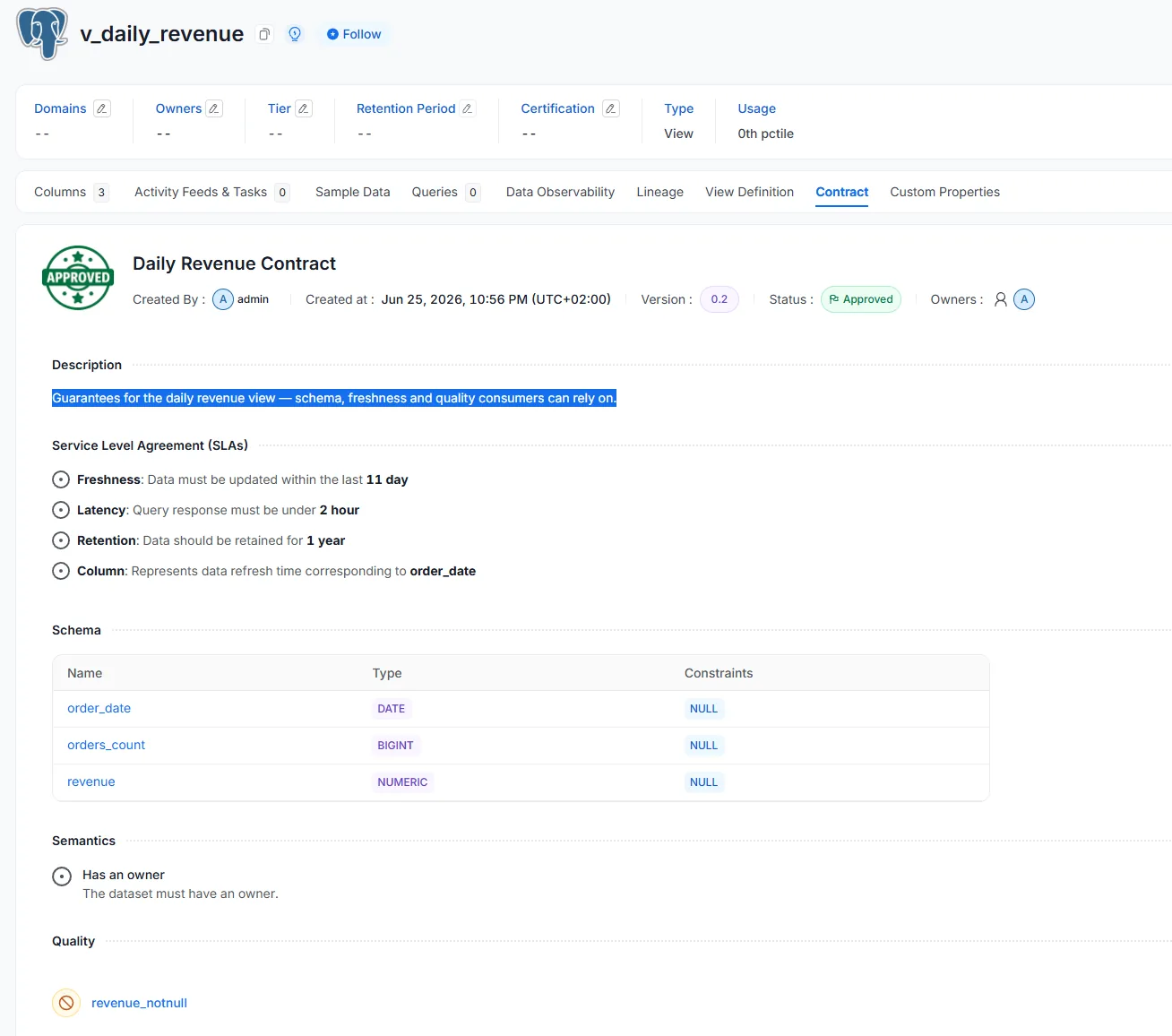
v_daily_revenue — schema, ownership, and SLA bound into one enforceable agreement.A data contract turns implicit assumptions ("revenue is always there, daily, numeric") into an explicit, checkable agreement between producers and consumers. It's where catalog, quality, ownership and SLA stop being separate fields and become a single promise the platform can enforce.
3.3 — It's all an API
Everything you did by clicking is a REST call underneath. That matters for automation — scripted checks, CI pipelines, bulk updates, or wiring OpenMetadata to other tools. Two ways to drive it:
- REST API — full CRUD over every entity, lineage, glossary, tests, and
contracts. Browse it at
localhost:8585/docs(Swagger). - Python SDK (
openmetadata-ingestion) — a typed client over the same API.
A runnable starter lives at openmetadata-lab/api/explore_api.py — it authenticates and
reads entities. Here's the shape of a first call:
import os, requests
API = "http://localhost:8585/api/v1"
H = {"Authorization": f"Bearer {os.environ['OM_JWT_TOKEN']}"}
# list database services — the 'services' from Lesson 1
r = requests.get(f"{API}/services/databaseServices", headers=H)
for s in r.json()["data"]:
    print(s["name"], s["fullyQualifiedName"])
Grab a JWT from Settings → Bots → ingestion-bot, set it as
OM_JWT_TOKEN, then run python api/explore_api.py. Bots are how you
authenticate programmatic clients.
3.4 — ODCS: an open standard worth knowing
The contract wizard's tabs mirror the Open Data Contract Standard (ODCS) — an open YAML standard (stewarded by the Bitol project under the Linux Foundation) that describes a dataset's schema, quality, SLAs, ownership and support in one document. OpenMetadata can import and export contracts in this format (the Import ODCS option you saw), so a contract stays portable and tool-agnostic. Worth knowing as the emerging lingua franca of data contracts.
Checkpoint — the whole platform
Your deliverable
Here's what you've actually built across the three lessons — a real, governed catalog you can
keep exploring: the online_shop source ingested, enriched, classified, owned, tested,
traced and put under contract.
online_shop catalog.The catalog is the skeleton (L1). Lineage connects it into a graph (L2). Governance hangs off entities, and a data contract binds it all to one dataset, enforceably (L3). Next, step back from the buttons: how does all this map to the DAMA-DMBOK body of knowledge — and where does the tool stop and organisation begin?