Lineage
Lineage is the backbone of governance. You can't do impact analysis, root-cause a bad number, or enforce a contract without knowing where data comes from and where it goes.
2.1 — What lineage actually is
Lineage is a directed graph: nodes are entities (tables, columns, dashboards, pipelines), edges are "data flows from A to B". Two resolutions:
- Table-level — in our shop,
orders→v_daily_revenue. Good for coarse impact analysis: "what depends onorders?" - Column-level —
orders.total_amount→v_daily_revenue.revenue. The powerful one: it tells you exactly which downstream fields a column change breaks.
OpenMetadata can also extend lineage past tables into dashboards and pipelines — not in our small lab, but that's how you'd trace a number on an executive dashboard all the way back to the source column. That end-to-end trace is the payoff.
Lineage lives in DMBOK's Data Integration & Interoperability knowledge area and enriches Metadata Management. It's what makes impact analysis and root-cause possible — and a prerequisite for trustworthy Data Quality and governance.
2.2 — How lineage gets created
Four ways, roughly in order of automation:
| Method | How |
|---|---|
| Query-log / view parsing (auto) | The lineage & usage workflows read query history (or view DDL), parse the SQL, and infer INSERT INTO target SELECT … FROM source. How most table lineage appears with no manual work. |
| dbt (auto) | Ingesting a dbt project turns ref() relationships into lineage — including column-level, with tests and descriptions. |
| API / SDK (programmatic) | You can PUT lineage edges directly — handy for custom integrations or sources OpenMetadata can't auto-parse. |
| Manual (UI) | Drag-and-drop edges in the Lineage tab. Good for filling gaps the parser missed. |
The parser needs query history or view DDL it can read. Ad-hoc loads, external transforms, or sources it can't see produce gaps — which you fill manually or via API. Knowing why a gap exists is half of governance work.
The shop database has a view v_daily_revenue built from the orders
table. That's a perfect, readable lineage relationship: orders is the source,
v_daily_revenue is downstream.
Because v_daily_revenue is a view, OpenMetadata read its
SELECT … FROM orders definition during the Metadata ingestion and drew the
orders → v_daily_revenue edge for you — no extra workflow needed.
Open v_daily_revenue → Lineage tab and you'll likely see it already.
(Check the View Definition tab to see the exact SQL that produced it.)
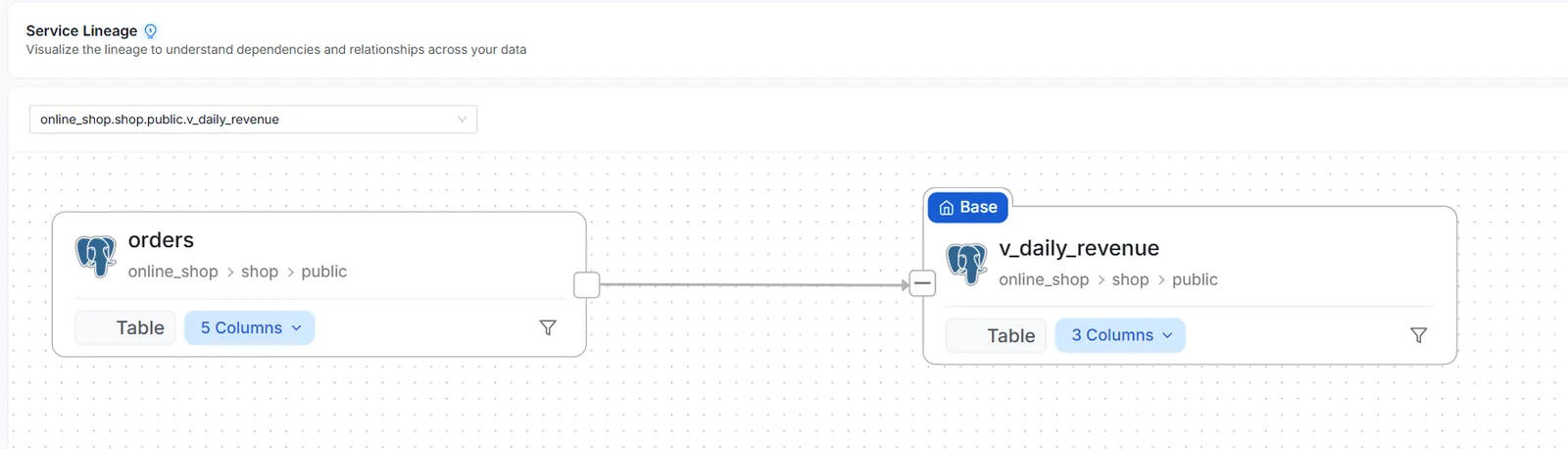
orders → v_daily_revenue.Do thisRead the lineage you already have
- Open
v_daily_revenue→ Lineage tab. Confirm theorders → v_daily_revenueedge. - Expand columns via the "5 Columns" / "3 Columns" dropdowns, then click Edit on the graph (top-right) — this reveals the auto-derived column-level links. (They're often hidden in normal view; Edit mode just displays them.)
- You'll see
order_date → order_date(passes through) andtotal_amount → revenue(becauserevenue = SUM(total_amount)). Noticeorders_counthas no incoming line — it'sCOUNT(*), an aggregate with no single source column. That's correct. Exit Edit without saving — you changed nothing. - Open the View Definition tab to read the
SELECT … FROM ordersthat created this lineage.
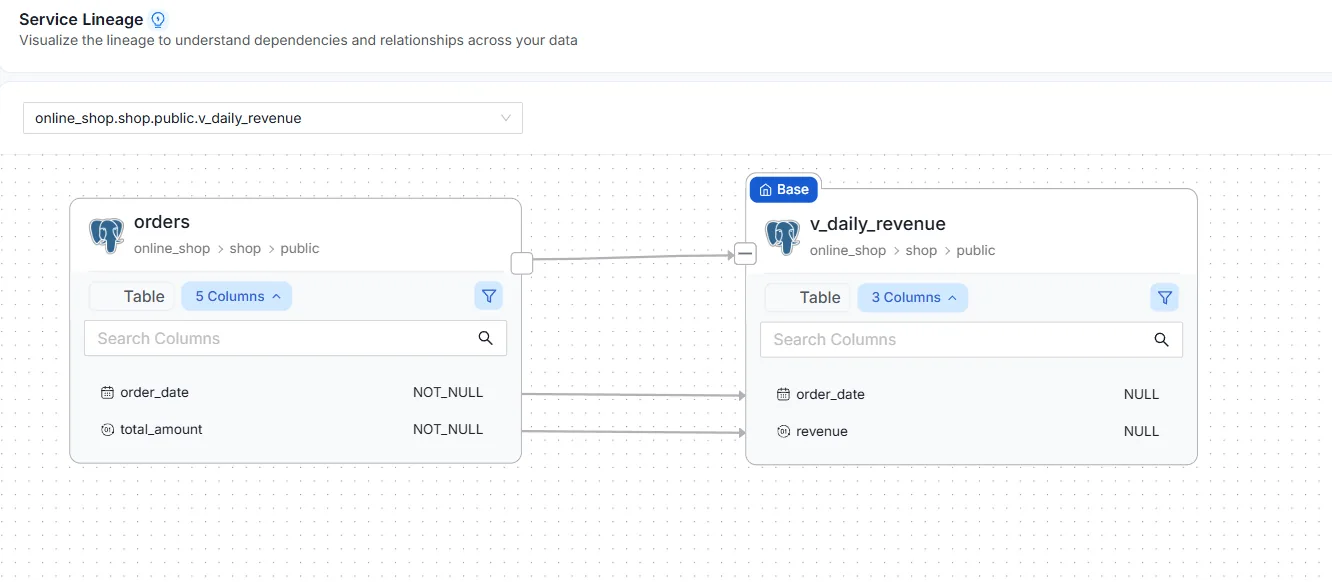
total_amount → revenue and order_date → order_date. orders_count has no source — it's COUNT(*).The drag-and-drop method below is how you'd add lineage that wasn't auto-detected (e.g. between two plain tables loaded by an external process). Good to know even if you didn't need it here.
Do thisCreate lineage by hand: orders → v_daily_revenue
- In
online_shop, open theorderstable. - Lineage tab → Edit → drag an edge from
orderstov_daily_revenue. - Save, then open
v_daily_revenue's Lineage tab — the edge shows from both sides. You've asserted that revenue flows from orders.
2.3 — Why this is the governance backbone
Hold these three use cases in mind — they're what lineage is ultimately for:
- Impact analysis — "if I change/drop this column, what breaks downstream?" Walk the graph forward.
- Root cause — "this dashboard number looks wrong, where did it come from?" Walk the graph backward.
- Contract enforcement — a contract on
v_daily_revenueis only enforceable if you know its upstream dependency (orders) and can detect when it changes shape.