Enforce the Promise: dbt, OpenMetadata and ODCS
A data contract is a promise written in a file. It might say that a table will always have these columns, that an identifier will never be empty, or that the data refreshes every day. The promise is clear, it is versioned, and the team reviews it. By itself, though, it protects nothing. This lab gives each of three tools one clear job, then builds the part that actually checks the promise and stops whatever would break it.
This lab continues the earlier OpenMetadata lab and reuses its
online_shop Postgres, with the same customers, orders and products tables and a
catalog that is already running. If you have not done that lab yet, start there. We pick up right
where it left off and add dbt as the transformation layer on top.
Most people assume dbt and OpenMetadata do the same job, and they really don't. dbt is the worker and OpenMetadata is the librarian. Neither of them is a contract on its own; that role belongs to ODCS, and enforcement is yet another layer that sits on top of all three.
dbt
It does the work. It runs SQL, creates tables, and turns raw data into clean, tested models.
It only ever sees its own project, though. After every run it leaves three records behind:
manifest.json, catalog.json and run_results.json.
OpenMetadata
It watches. It builds nothing of its own, but it keeps track of everything that exists and holds the catalog together: who owns what, how things connect, and whether quality holds. It reads the records dbt leaves and turns them into lineage, documentation and test results.
By the end, you'll be able to…
- Explain why dbt and OpenMetadata play different roles, and why neither of them is a contract.
- Build and test models with dbt, and tell a dbt model contract apart from an ODCS contract.
- Ingest dbt's artifacts into OpenMetadata to get lineage, documentation that stays in sync, and test results.
- Read and write an ODCS v3.1.0 contract, and run it against live data.
- Enforce the contract at the CI gate and on a schedule in the catalog, and know which layer is really protecting the data.
What you'll learn
dbt as the worker
Staging and mart models, dbt model contracts, tests, and the three artifact files every run produces.
OpenMetadata as the librarian
Turning dbt artifacts into lineage, documentation that tracks the code, and a history of test results.
ODCS, the standard
The Open Data Contract Standard v3.1.0, and how it differs from a dbt model contract.
Three enforcement layers
Before (CI), during (streaming) and after (catalog), plus the two a warehouse team really needs.
The path
Setup
Reuse the shop DB and OpenMetadata, install dbt, and wire it to Postgres.
dbt, the worker
Build models, compare a dbt model contract with schema tests, and meet the three artifact files.
OpenMetadata, the librarian
Turn dbt artifacts into lineage, synced docs and test results in the catalog.
ODCS, the contract
Write the ODCS v3.1.0 contract, and see how it differs from dbt's model contract.
Enforcement: three layers
Wire Layer 1 (CI) and Layer 3 (catalog), skip streaming, and sidestep the pitfall.
Conclusion: verdict and operating model
Where each tool sits, an honest set of pros and cons, and why judgment beats tenure here.
Every lesson comes with a Do this exercise. Run the commands, break the data on purpose, and watch the contract turn red in your own instance. The understanding comes from doing rather than reading. Your progress is saved in this browser, so use the Mark complete buttons as you go.
Setup: get the pieces running
Four pieces, each with one job. None of them doubles up: dbt never catalogs, OpenMetadata never transforms, and the contract file never enforces itself.
| Piece | Role | Where |
|---|---|---|
| Shop Postgres | the warehouse, holding raw tables and everything dbt builds | host port 5433 |
| dbt (Core + dbt-postgres) | the worker, turning raw tables into a tested analytics schema | your host |
| OpenMetadata | the librarian, cataloging and ingesting dbt artifacts | UI 8585 |
| Data Contract CLI | the enforcement engine at the CI gate | your host |
You need three things in place. Docker Desktop, installed and running (on Windows it uses the WSL2 backend). Python 3.10 to 3.13. And the earlier OpenMetadata lab, whose shop database this lab reuses; OpenMetadata itself is only needed from Lesson 2 onward.
The commands below use paths relative to this lab folder
(dbt-openmetadata-odcs-lab), so open your terminal there first. If a
cd ..\openmetadata-lab\... line complains that the path does not exist, you are
standing in the wrong folder. Either cd into the lab folder or use the full path.
Step 1 · Start Docker Desktop
Open Docker Desktop and wait until it reports that the engine is running. Until then, every
docker command fails with a "cannot connect to the Docker daemon" error.
docker info # succeeds once the engine is up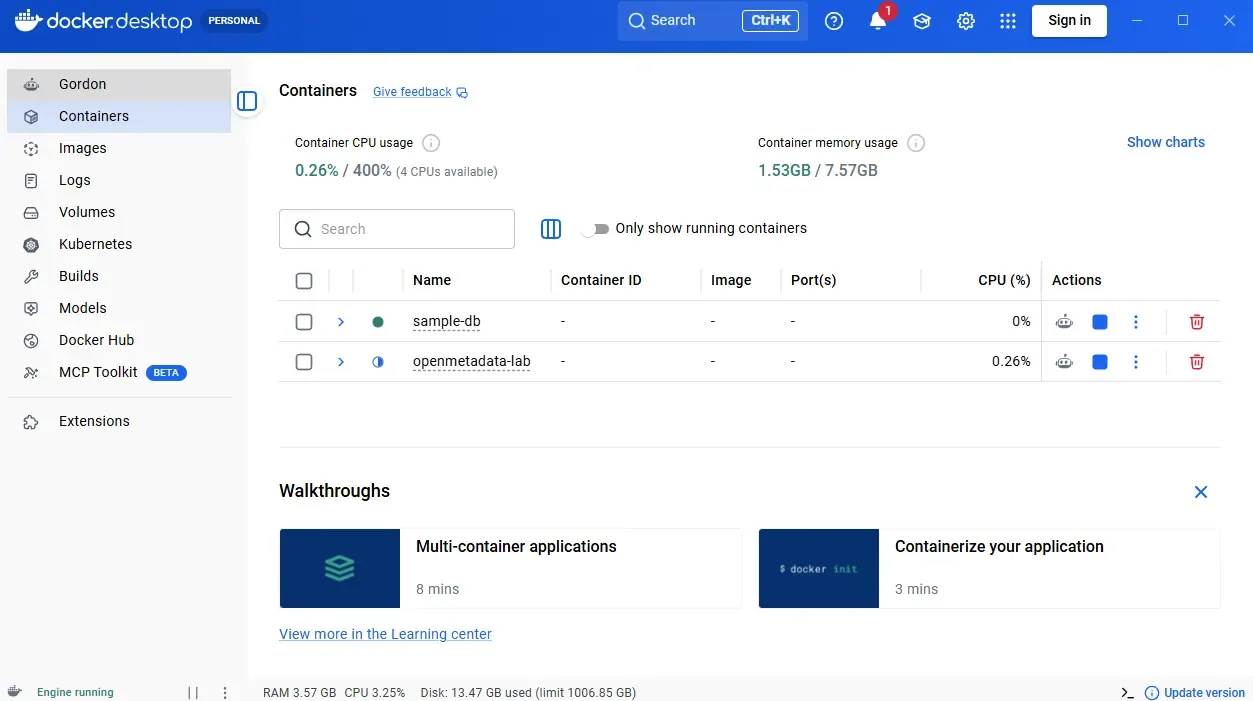
Step 2 · Start the shop database
# from this lab folder
cd ..\openmetadata-lab\sample-db
docker compose up -d
docker ps --filter name=shop_postgres   # expect 0.0.0.0:5433->5432
Step 3 · Install dbt and the Data Contract CLI
# back in this lab folder (dbt-openmetadata-odcs-lab)
python -m venv .venv
.\.venv\Scripts\Activate.ps1          # macOS/Linux: source .venv/bin/activate
pip install "dbt-core~=1.11.0" dbt-postgres "datacontract-cli[postgres]"
dbt --version                         # dbt Core 1.11.x, adapter postgres 1.11.x
Step 4 · Copy the dbt profile into place
dbt only reads a file named exactly profiles.yml, so copy the example across
before you connect. Skip this and you will see “Could not find profile named 'shop'”.
Copy-Item dbt\profiles.example.yml dbt\profiles.yml
# macOS/Linux: cp dbt/profiles.example.yml dbt/profiles.yml
Step 5 · Point dbt at the shop DB and test it
$env:DBT_PROFILES_DIR = "$PWD\dbt"   # macOS/Linux: export DBT_PROFILES_DIR="$(pwd)/dbt"
cd dbt
dbt debug                          # expect: All checks passed!
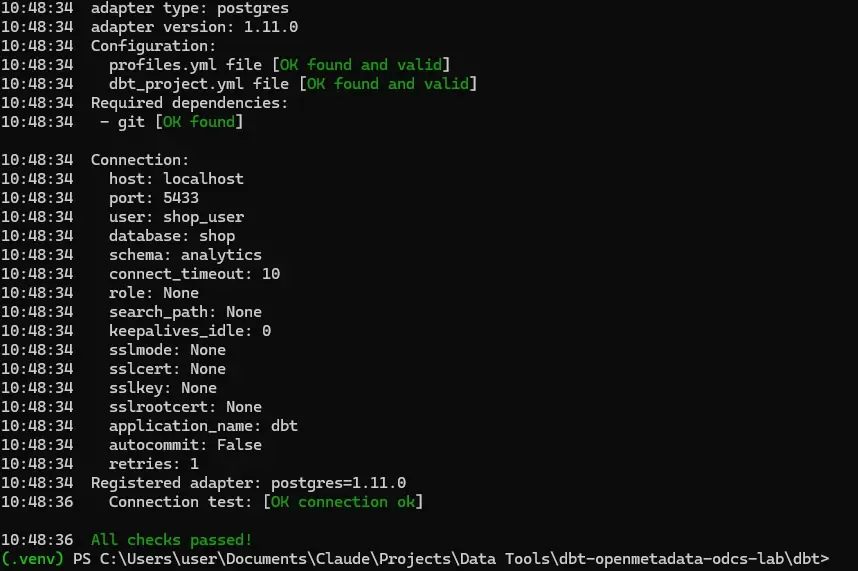
dbt debug connecting to the shop DB and ending in “All checks passed!”dbt is the worker, so it runs wherever your transformations run. On the host the connection
stays simple: host=localhost, port=5433. OpenMetadata runs inside Docker and
reaches the same database at host.docker.internal:5433. It is the same database
seen from a different place, and that small difference trips people up all the time, so keep it
in mind.
Three errors come up often, and each has a quick fix:
- “failed to connect to the Docker API … the daemon is running”: Docker Desktop is not started. Launch it, wait for the engine, then retry.
- “Could not find profile named 'shop'”: you skipped Step 4. dbt needs
profiles.yml, notprofiles.example.yml. - “Cannot find path … openmetadata-lab”: you ran a relative
cdfrom the wrong folder. Start from this lab folder, or use the full path.
dbt, the worker
Use dbt to build clean, tested models from the raw shop tables. Pay attention to the three files it leaves behind, because those files are the entire bridge to OpenMetadata.
shop.public.orders (raw)          shop.public.customers (raw)
        │                                 │
        ▼                                 ▼
   stg_orders (view)                stg_customers (view)     ← staging: clean 1:1
        │
        ▼
   daily_revenue (table)                                     ← mart: the dashboard reads this
The mart daily_revenue is dbt's version of the hand-written
v_daily_revenue view from the OpenMetadata lab. The numbers are the same, but
now the table is materialized, tested and covered by a contract. Everything dbt builds goes into a
separate analytics schema, so raw and transformed data stay apart.
Do thisBuild the models
# from the dbt folder, with the venv active and DBT_PROFILES_DIR set in Setup
dbt deps          # fetch dbt_utils (range tests)
dbt build         # run + test every model, in dependency order
Confirm dbt actually created objects in the warehouse. The shop database runs in Docker, so
query it through the container (no local psql needed):
docker exec shop_postgres psql -U shop_user -d shop -c "select * from analytics.daily_revenue;"
You built real objects in the database. That is the worker doing its job, and it is something OpenMetadata could never do, because it builds nothing.
Two kinds of “contract” already live in this project
This is the distinction teams miss most often, so it helps to see it with the code in front of you.
| Schema tests | dbt model contract | |
|---|---|---|
| Checks | do the values behave? | is the shape guaranteed? |
| Runs | dbt test | dbt build (build time) |
| Example | unique, not_null, accepted_range | data_type: date must match the output column |
With contract: enforced: true on the mart, dbt checks at build time that the
output columns match the declared names and types exactly. If they drift, the build fails before
the table is ever created.
Do thisBreak the shape on purpose
This one is a file edit, not a command to paste in the terminal. Open the mart model in
your editor (it lives in this lab's dbt folder):
dbt\models\marts\daily_revenue.sql
Find the revenue line near the bottom and force the wrong type by adding
::text:
    count(*)::bigint          as orders_count,
    sum(total_amount)::text   as revenue      -- was: sum(total_amount) as revenue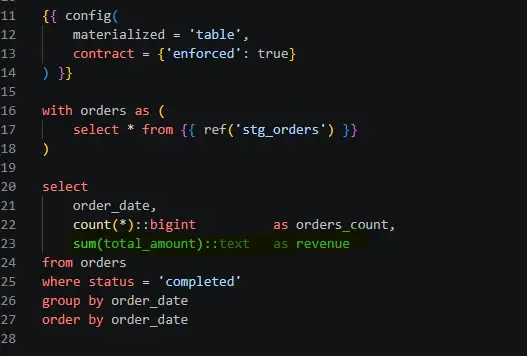
daily_revenue.sqlSave the file, then build just that model:
dbt build --select daily_revenue
dbt refuses, because the output column no longer matches the contract:
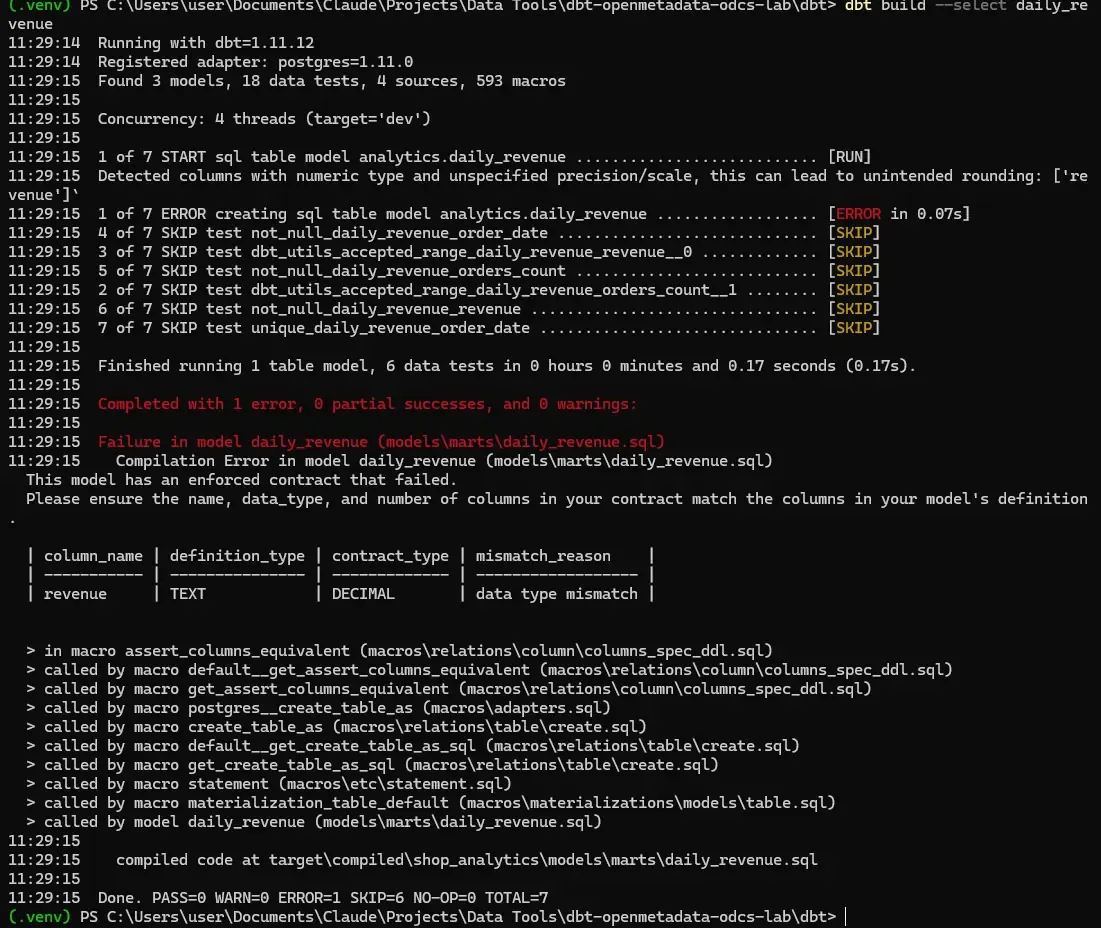
revenue came out TEXT, but the contract requires a numeric typeNow put the line back to sum(total_amount) as revenue, save, and rebuild to
return the lab to health:
dbt build --select daily_revenue
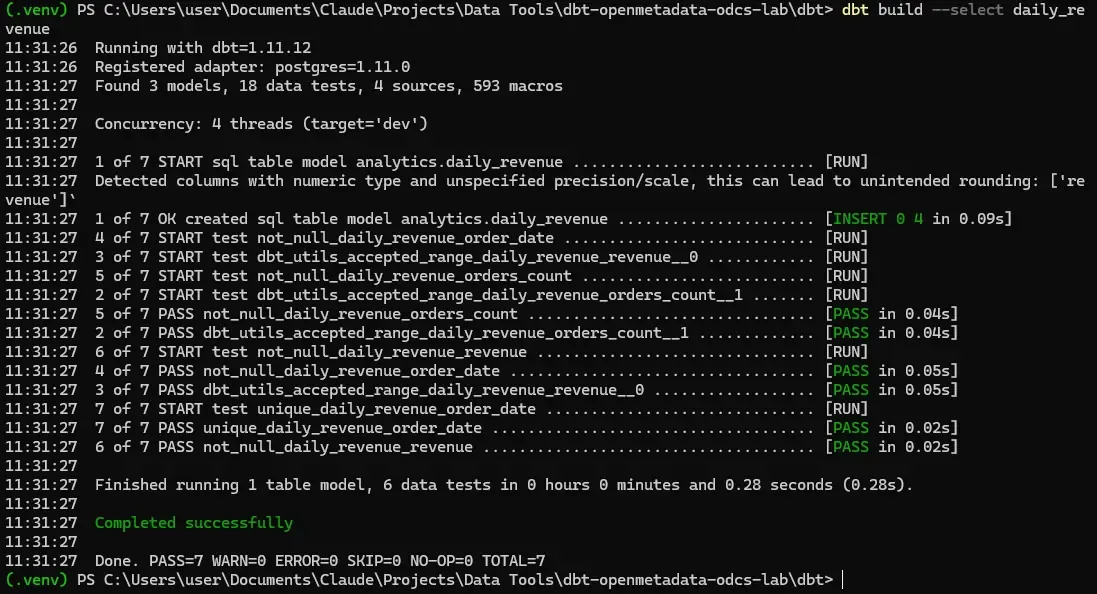
You just watched Layer 1 enforcement work inside dbt: the problem never made it as far as the table.
A dbt contract guarantees columns and types inside your dbt project. ODCS, which you will meet in Lesson 3, describes the whole agreement, including SLAs, ownership and support, across teams that never touch your dbt project. A sensible order of adoption is to start with dbt's native contracts on your final models, then reach for ODCS when you need to formalize an agreement with the outside world.
The three files dbt leaves behind
| File | Generated by | Holds |
|---|---|---|
manifest.json | dbt run/build | the graph, columns, dependencies (for lineage), docs and compiled SQL. Required. |
catalog.json | dbt docs generate | real column types and stats. Recommended. |
run_results.json | dbt run/test | the outcome of the last run, meaning which tests passed or failed. Recommended. |
Do thisGenerate all three cleanly
Run them in the order OpenMetadata expects, with the tests before the catalog, so the latest results are captured:
dbt run             # manifest.json + run_results.json
dbt test            # updates run_results.json with test outcomes
dbt docs generate   # catalog.json (+ refreshes manifest.json)
ls target/*.json    # manifest.json, catalog.json, run_results.json all present
Checkpoint
dbt test and passes or fails).
A model contract checks the shape, meaning column names and types, at build time,
and fails the build before the table exists. Neither of them is ODCS.manifest.json. It carries the dependency graph used for lineage, along with
columns, docs and compiled SQL. catalog.json and run_results.json
are recommended (types and test results) but optional.OpenMetadata, the librarian
Hand dbt's artifacts to OpenMetadata and watch it observe. It builds lineage through your models, syncs the documentation you wrote in YAML, and shows your dbt test results in the catalog.
dbt run/test/docs generate               OpenMetadata
        │                                       │
   target/manifest.json    ──ingest──▶   lineage (raw → stg → mart)
   target/catalog.json     ──ingest──▶   column types + docs, in sync with code
   target/run_results.json ──ingest──▶   test pass/fail history
Open OpenMetadata first
Everything in this lesson happens in the OpenMetadata web app, which is a different thing from Docker Desktop. Docker only keeps the containers running in the background; the clicking is all in your browser.
- Go to
http://localhost:8585in a browser. - Sign in with the default lab credentials: user
admin@open-metadata.org, passwordadmin. - Find your shop database service under the gear icon → Settings → Services → Databases.
From the OpenMetadata lab it is called
online_shop.
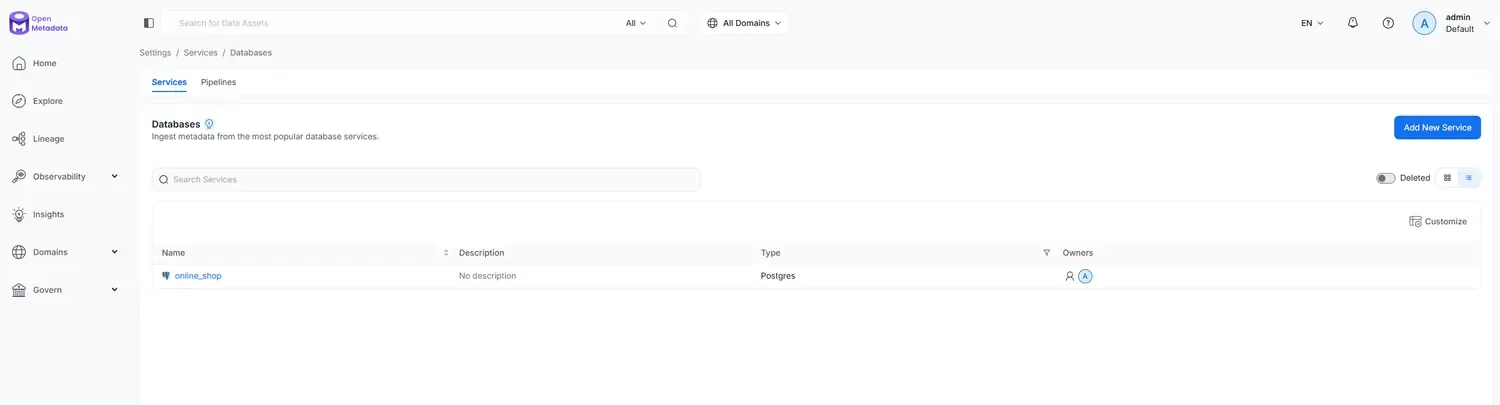
online_shop serviceBefore you push the dbt information, open the online_shop service and run its
Metadata ingestion once, then confirm that stg_orders,
stg_customers and daily_revenue all appear under the
analytics schema. The dbt step only enriches tables that already exist: it
adds lineage, descriptions and test results onto catalog entities. If those tables are not there
yet, the push still succeeds but attaches nothing, and you will see Updated records: 0
in the summary. That service reaches Postgres through host.docker.internal:5433,
which is how a container connects to a database on your host.
Ingest the dbt artifacts
OpenMetadata's built-in ingestion runs inside a container, which cannot read the
target/ files sitting on your Windows host. The simplest way around that on a local
setup is the metadata ingest-dbt command: it runs on your host, where the files
already are, and pushes everything to OpenMetadata over its API.
Do thisIngest with metadata ingest-dbt
1. Install the OpenMetadata ingestion package into the same venv you used for dbt. It must match your server's major.minor version, or it refuses to connect. This lab runs OpenMetadata 1.12.x, so pin the client to 1.12:
pip install "openmetadata-ingestion[dbt]==1.12.*"
# the client version must match the OpenMetadata server (check yours in Settings)
2. Get an API token: in OpenMetadata, go to Settings → Bots → ingestion-bot and copy its JWT token.
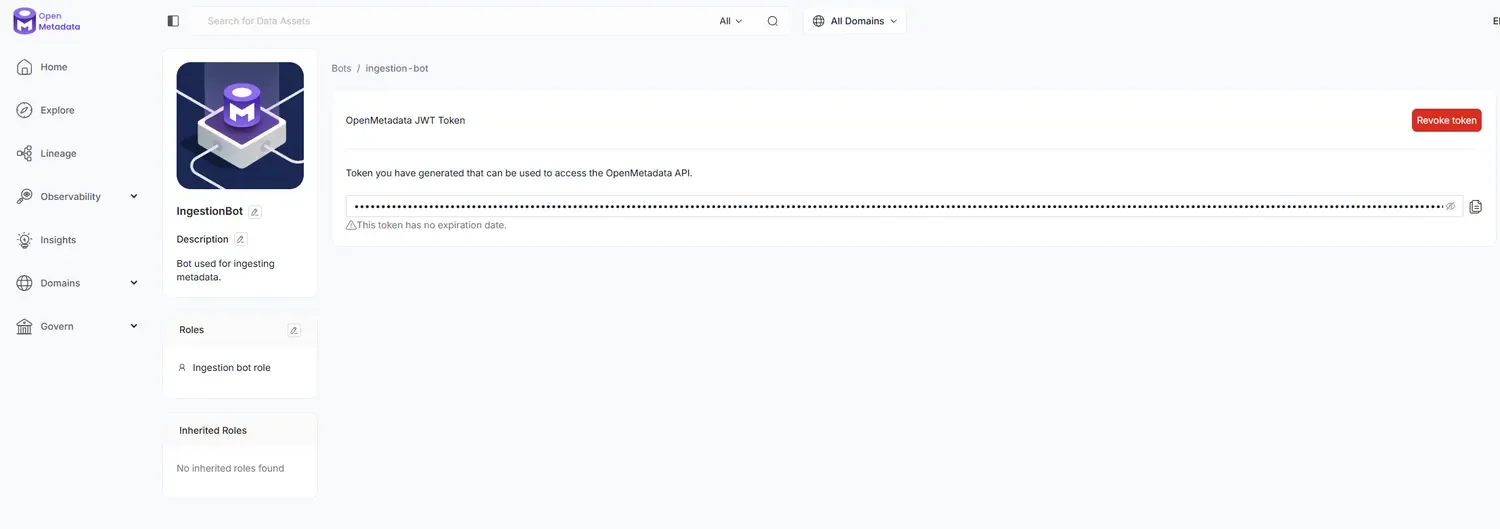
3. Add an openmetadata block to the vars: section of
dbt\dbt_project.yml (add a vars: section if there isn't one):
vars:
  openmetadata_host_port: "http://localhost:8585/api"
  openmetadata_jwt_token: "<paste the ingestion-bot token>"
  openmetadata_service_name: "online_shop"
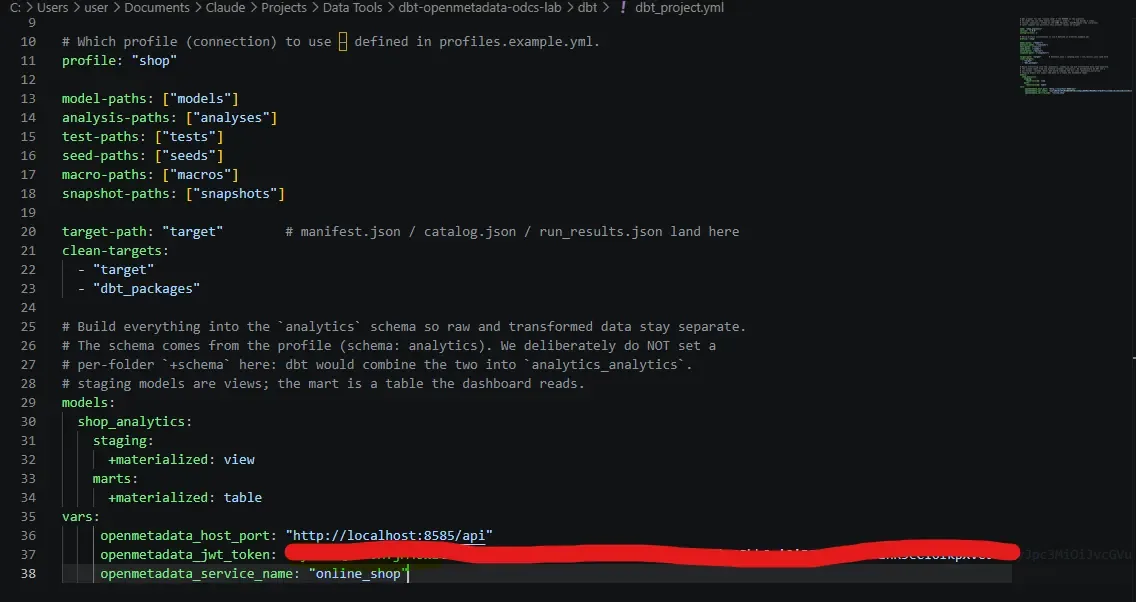
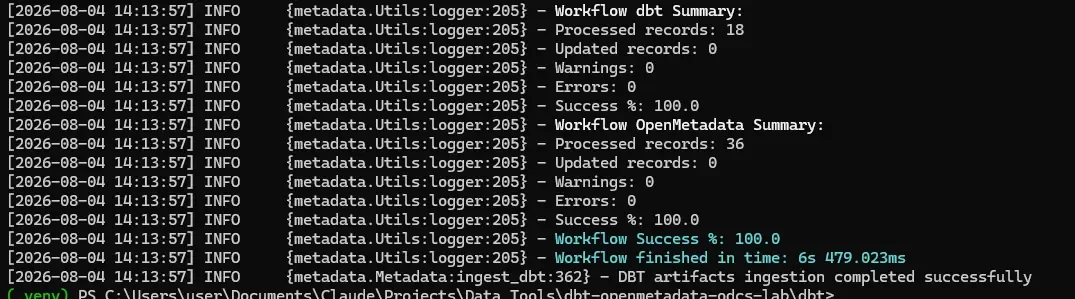
vars: block added to dbt_project.yml (token redacted)4. You already generated the artifacts in Lesson 1, so from the dbt folder
run:
metadata ingest-dbt
It finds target/, connects to OpenMetadata, and reports the models it processed.
This is a local lab, so pasting the token is fine; for anything real, use an environment
variable instead of writing it into the file.
AlternativeThe UI method (needs the files inside the container)
You can also add a dbt ingestion from the UI, on the online_shop service under
Ingestions → Add Ingestion → dbt Configuration, with source Local Storage. The
catch is that the path has to be one the ingestion container can see, so you copy the three
files into it first (find the container name with docker ps; it is usually
openmetadata_ingestion):
docker cp dbt\target\manifest.json    openmetadata_ingestion:/tmp/dbt/manifest.json
docker cp dbt\target\catalog.json     openmetadata_ingestion:/tmp/dbt/catalog.json
docker cp dbt\target\run_results.json openmetadata_ingestion:/tmp/dbt/run_results.json
Then point the ingestion at /tmp/dbt/manifest.json and the other two. The
host-side command above avoids all of this, which is why it is the recommended path.
Do thisSee what the librarian now knows
- Lineage. Open
analytics.daily_revenueand go to Lineage. You should seepublic.orders, thenstg_orders, thendaily_revenue, drawn from thedepends_ongraph in the manifest. - Docs in sync. The column descriptions you wrote in
_marts.ymlare now in the catalog. Change the YAML, re-run and re-ingest, and the catalog updates. - dbt tab. The model shows its compiled SQL from the manifest.
- Test results. The
unique,not_nulland range outcomes fromrun_results.jsonappear as pass or fail.
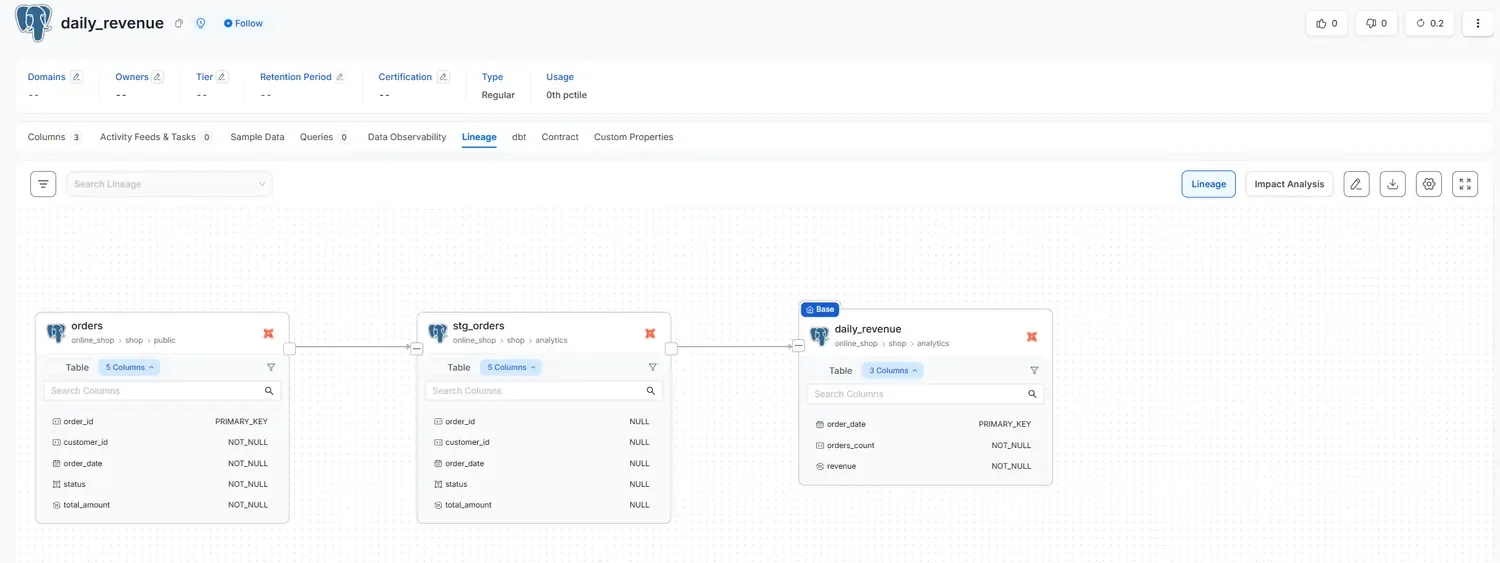
orders → stg_orders → daily_revenueYou didn't teach OpenMetadata any of this. It observed all of it from the records dbt left behind.
dbt only knows its own perimeter, so it has no idea who consumes the table or what SLA finance is counting on. OpenMetadata only describes what already exists, which makes it a mirror rather than a promise. The formal agreement between producer and consumer is the contract, and that agreement now has a standard.
ODCS, the contract
Write the formal agreement that binds the producer of daily_revenue to its
consumers, using the open standard the industry has now settled on.
ODCS, the Open Data Contract Standard, is an open, machine-readable YAML format. Version 3.1.0 shipped in December 2025 under the Linux Foundation's Bitol project, and the competing specification was deprecated in the same period. In 2026, a data contract is written in ODCS. Reference: bitol.io.
ODCS is not the dbt model contract
You now have two contracts on one table, and they do different jobs:
| dbt model contract | ODCS contract | |
|---|---|---|
| Lives in | _marts.yml | daily_revenue.odcs.yaml |
| Covers | column names and types | schema, quality, SLA, ownership, roles, support |
| Scope | inside your dbt project | the whole agreement, across teams |
| Enforced | at dbt build | the CI gate, then on a schedule in the catalog |
| Answers | “did the model keep its shape?” | “is the producer keeping the full promise?” |
Anatomy of the contract
A single document covers the whole agreement. The servers block is what makes it
executable, since that is where the CLI connects.
apiVersion: v3.1.0
kind: DataContract
id: daily-revenue-001
name: Daily Revenue Contract
version: 1.0.0
status: active
domain: revenue
servers:
  - server: shop-postgres
    type: postgres
    host: localhost
    port: 5433
    database: shop
    schema: analytics          # the dbt-built schema, not public
schema:
  - name: daily_revenue
    physicalType: table
    properties:
      - name: order_date
        physicalType: DATE
        primaryKey: true
        required: true
        unique: true
      - name: revenue
        physicalType: NUMERIC
        required: true
        classification: restricted
    quality:
      - type: library
        metric: rowCount
        mustBeGreaterThan: 0
      - type: sql
        description: Revenue must never be negative.
        query: SELECT COUNT(*) FROM daily_revenue WHERE revenue < 0
        mustBe: 0
team:
  members: [{username: bmillet, role: Owner}]
slaProperties:
  - {property: frequency, value: "1", unit: d}
  - {property: freshness, value: "24", unit: h}
support:
  - {channel: "#data-revenue", tool: slack}
That SLA, ownership and support section is the part that could never live in a dbt model contract. It is an agreement between people, not a check on the shape of a table.
Do thisValidate the document (no DB needed)
Run this from the lab root (the folder that contains contracts\), as
one line. The backslash line continuation you see in bash examples breaks PowerShell.
pip install check-jsonschema
check-jsonschema --schemafile https://raw.githubusercontent.com/bitol-io/open-data-contract-standard/main/schema/odcs-json-schema-latest.json contracts\daily_revenue.odcs.yaml
Expected output: ok -- validation done. Green means the document is well-formed
ODCS. It tells you nothing yet about whether the live data obeys it; that comes with enforcement
in Lesson 4.
One format detail learned the hard way: write the team block in the array
form (team: then - username: ...), not the object form with
name and members. Both pass the Bitol schema, but OpenMetadata's
importer in Lesson 4 only accepts the array form.
You now have a valid, versioned, reviewable ODCS document. By itself it still does nothing to stop someone breaking it tomorrow. When people say the contracts are live, the question worth asking is which layer is actually enforcing them today. If the honest answer is that the catalog is holding the file, the work is not finished.
Enforcement: three layers
Turn the contract from a promise on paper into one that protects. A contract is only worth as much as the check behind it, so the real question is not whether to verify but when. There are three moments to choose from.
| # | Moment | Where | Trade-off | Tool |
|---|---|---|---|---|
| 1 | Before | in CI | cheapest and most preventive, but only covers code | datacontract-cli, dbt contracts |
| 2 | During | streaming | real time, but complex and streaming-only | broker-side enforcement |
| 3 | After | the catalog | easy to install, finds out after the fact, and adds history and SLA | OpenMetadata 1.10+ |
For batch work, combine two of the layers and leave the third aside. Write the contracts in ODCS, enforce them at the CI gate (Layer 1), and wire OpenMetadata for scheduled validation (Layer 3). Layer 2, streaming, only earns its place when you genuinely have a stream to protect. This lab has none, and leaving it out is the right call rather than a gap.
Layer 1: enforce at the CI gate (before)
Block the break in the pull request, before it can ever reach the data. On every PR that
touches dbt/ or contracts/, three gates run against a throwaway
Postgres, cheapest first:
1 · Schema gate → is the ODCS file valid ODCS 3.1.0?   (check-jsonschema)
2 · Build gate  → dbt build (model contract + data tests)
3 · Data gate   → does the LIVE built data satisfy the ODCS contract?  (datacontract test)
Hit live on Windows / Python 3.13: installing datacontract-cli into dbt's venv
downgrades mashumaro below 3.11 (a pin from its collate-data-diff
dependency), and dbt then crashes with AttributeError: __class_getitem__. Give the
CLI its own venv (one-time, from the lab root):
python -m venv .venv-contract
.venv-contract\Scripts\pip install "datacontract-cli[postgres]"
If dbt already crashed, repair its venv with
pip install "mashumaro[msgpack]==3.14" (there is no 3.14.1; dbt needs
<3.15 and 3.14 supports Python 3.13). Real CI avoids all of this by running the two tools
in separate jobs.
Do thisRun the three gates locally
# gate 1 -- validate the ODCS document
check-jsonschema --schemafile https://raw.githubusercontent.com/bitol-io/open-data-contract-standard/main/schema/odcs-json-schema-latest.json contracts\daily_revenue.odcs.yaml
# gate 2 -- build and test the models
cd dbt ; dbt build ; cd ..
# gate 3 -- run the contract against the live data (CLI from its own venv)
$env:DATACONTRACT_POSTGRES_USERNAME = "shop_user"
$env:DATACONTRACT_POSTGRES_PASSWORD = "shop_pass"
.venv-contract\Scripts\datacontract test contracts\daily_revenue.odcs.yaml
Expect 13 checks green: the three quality rules plus the schema checks the CLI derives
from the contract's properties.
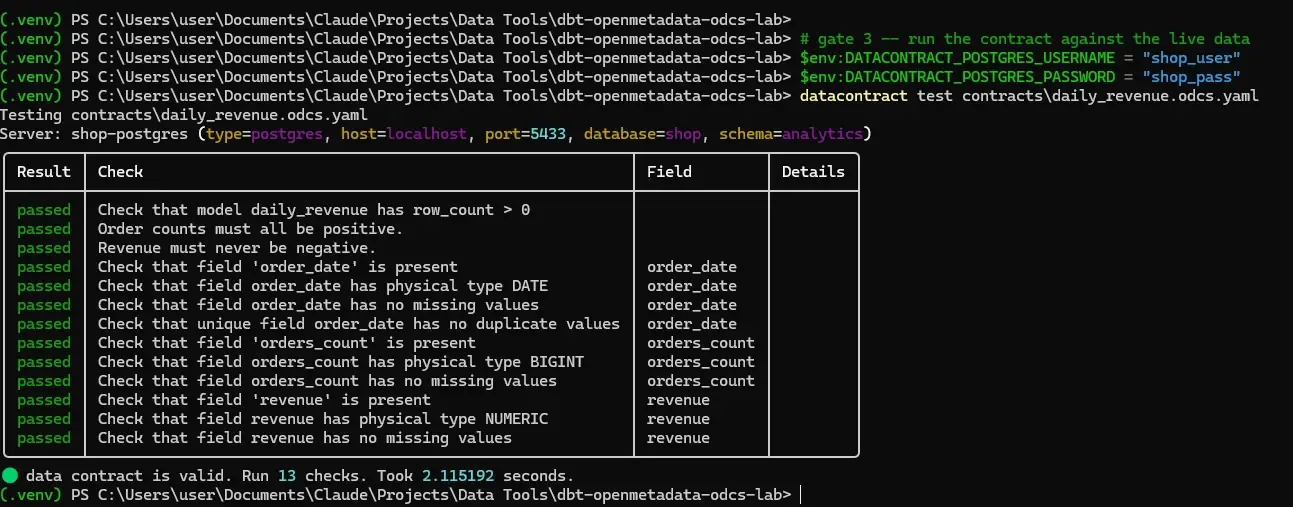
datacontract test connects via the servers block and runs every promise as SQLDo thisBreak the contract and watch the gates go red
Play the careless insider: insert a bad order straight into the warehouse, on a fresh day so that day's revenue comes out negative. (Putting it on a day that already has sales would only lower the total, not push it below zero — aggregation can hide bad source rows.)
docker exec shop_postgres psql -U shop_user -d shop -c "INSERT INTO public.orders (customer_id, order_date, status, total_amount) VALUES (1, '2025-05-10', 'completed', -50.00);"
Rebuild before you re-test. The mart is a table: if you skip dbt build,
the CLI happily validates the stale data and everything stays green. A green check is only
as fresh as the last build.
cd dbt ; dbt build ; cd ..
.venv-contract\Scripts\datacontract test contracts\daily_revenue.odcs.yaml
Both layers catch it: dbt build finishes with ERROR=1 (the model's own
data test — the worker's perimeter), and the contract goes red:
data contract is invalid, found the following errors:
1) Revenue must never be negative.: Actual was 1, expected = 0
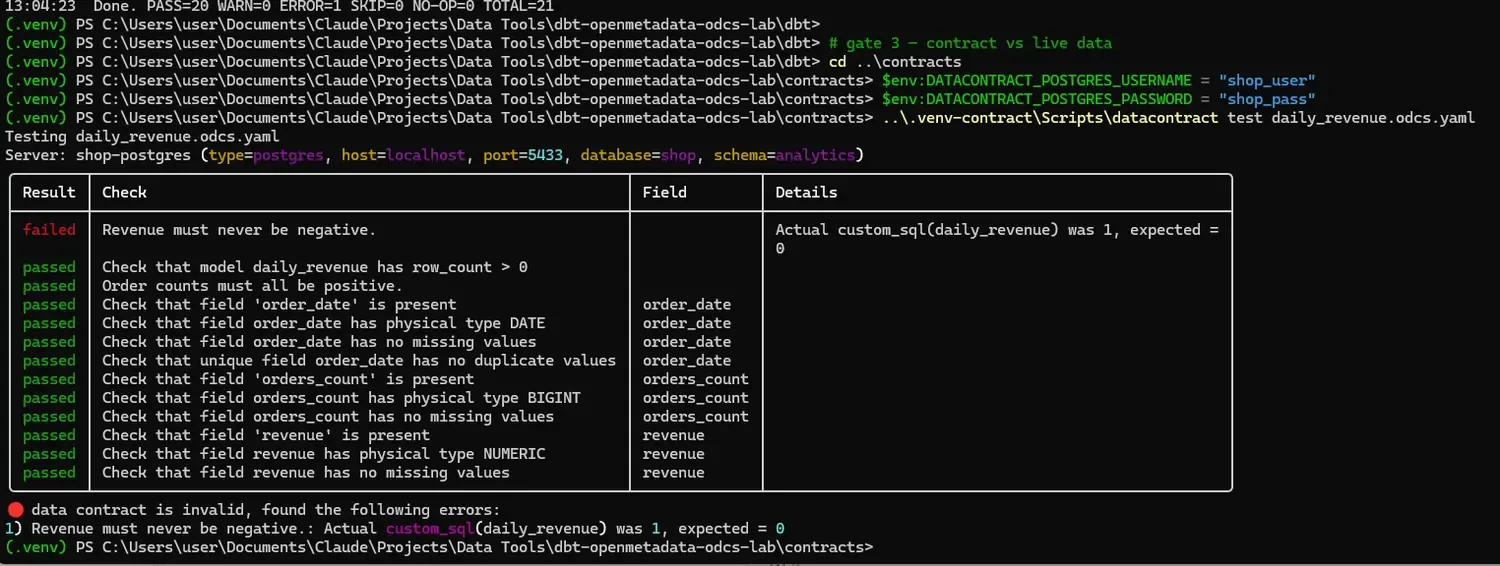
In a real PR this exit code blocks the merge. Clean up by deleting the bad row and rebuilding, then confirm green again:
docker exec shop_postgres psql -U shop_user -d shop -c "DELETE FROM public.orders WHERE total_amount < 0;"
cd dbt ; dbt build ; cd ..
.venv-contract\Scripts\datacontract test contracts\daily_revenue.odcs.yaml
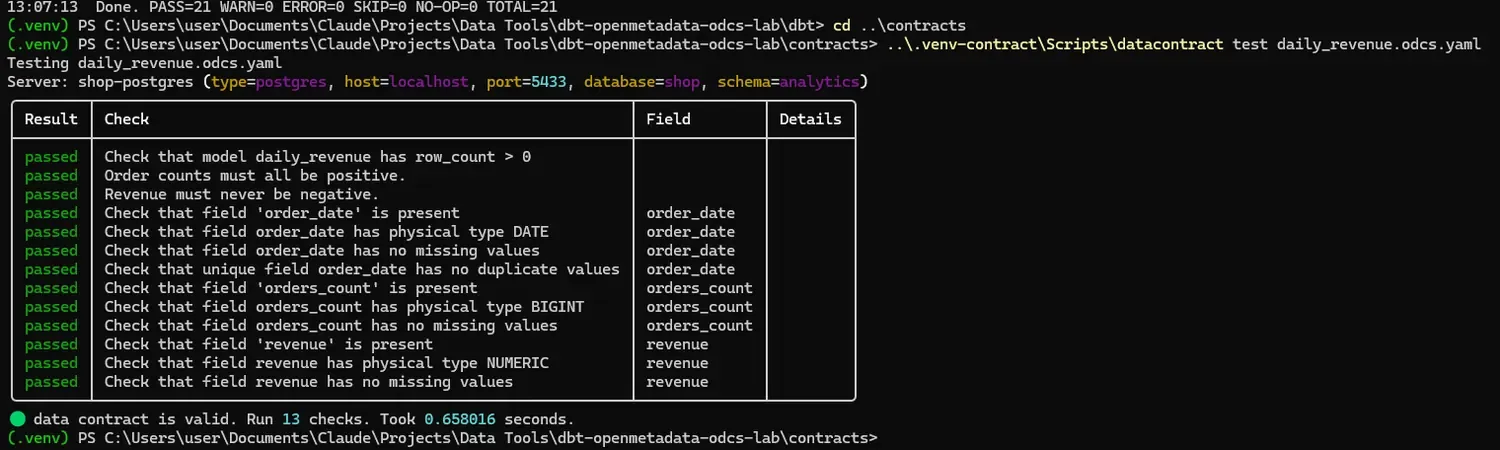
Layer 1 does have a limit: it only sees what goes through code, so a manual insert like the one you just made slips straight past CI — you only caught it because you ran the checks by hand. That is exactly why you also want Layer 3, which runs them on a schedule.
Layer 3: validate in the catalog on a schedule (after)
The data is already sitting in the warehouse. On a schedule, OpenMetadata re-runs the contract checks and flags anything that failed. You gain a history and SLA reporting that CI cannot give you. OpenMetadata added contracts in v1.9 (August 2025) and full ODCS 3.1 import and export in v1.10 (October 2025).
Do thisImport the ODCS contract into OpenMetadata
- Open localhost:8585
(login
admin@open-metadata.org/admin), searchdaily_revenueand open the table under theonline_shopservice. - Click the Contract tab. It starts empty — click the ˅ arrow on
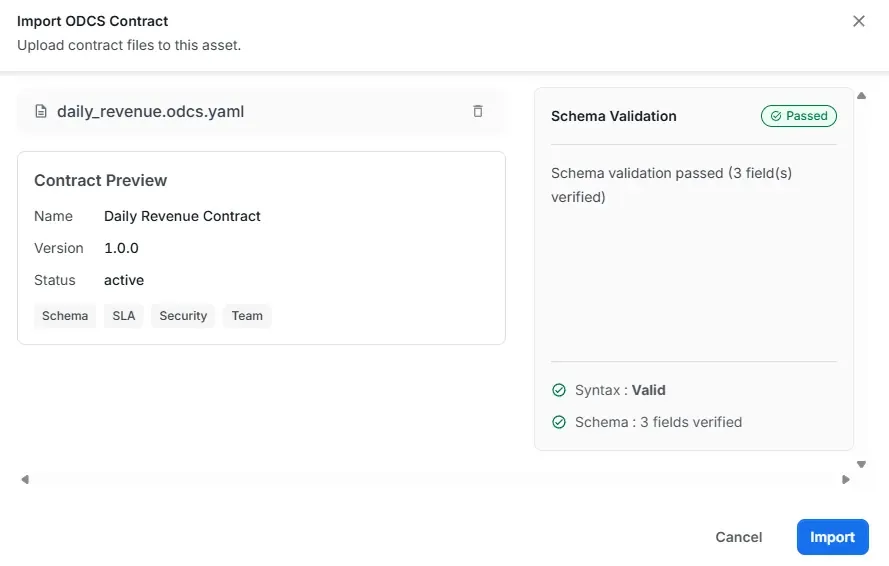
Add Contract and choose Import ODCS, then upload
contracts\daily_revenue.odcs.yaml. Wait for Schema Validation: Passed. If it fails withCannot deserialize ... ArrayListat theteamblock, your contract uses the object form — switch to the array form (see Lesson 3). - Click Import. The contract now shows in the tab: description, SLA (freshness / latency / retention), and the schema with PRIMARY_KEY and NOT_NULL constraints.
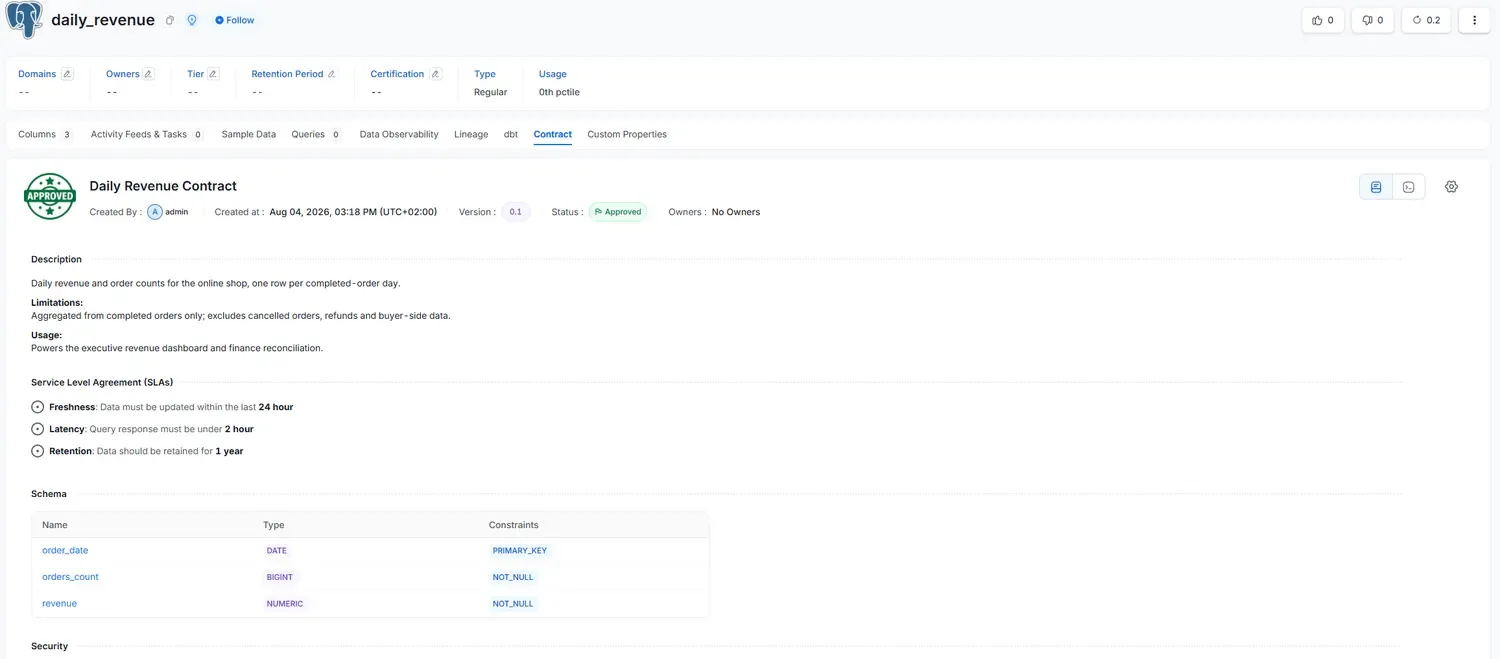
Now audit what survived. On a real run against OpenMetadata 1.12.6: description ✔,
schema and constraints ✔, SLA partially (frequency not surfaced) — and all
three quality rules silently dropped. No error, no warning. The catalog looks
protected while nothing checks revenue. That is the March 2026 pitfall, reproduced live.
Do thisRecreate the quality rules as native test cases and schedule them
Since the import dropped the quality rules, mirror them as native OpenMetadata test
cases via the API. The lab ships a script that reads the ingestion-bot JWT you already stored
in dbt/dbt_project.yml in Lesson 2:
# from the lab root (quote the path if it has spaces), dbt venv active
python scripts\create_om_test_cases.py
Expected: [ok] table found, [ok] test suite, then three
[ok] test case created lines for contract_row_count_gt_0,
contract_orders_count_positive and
contract_revenue_never_negative.
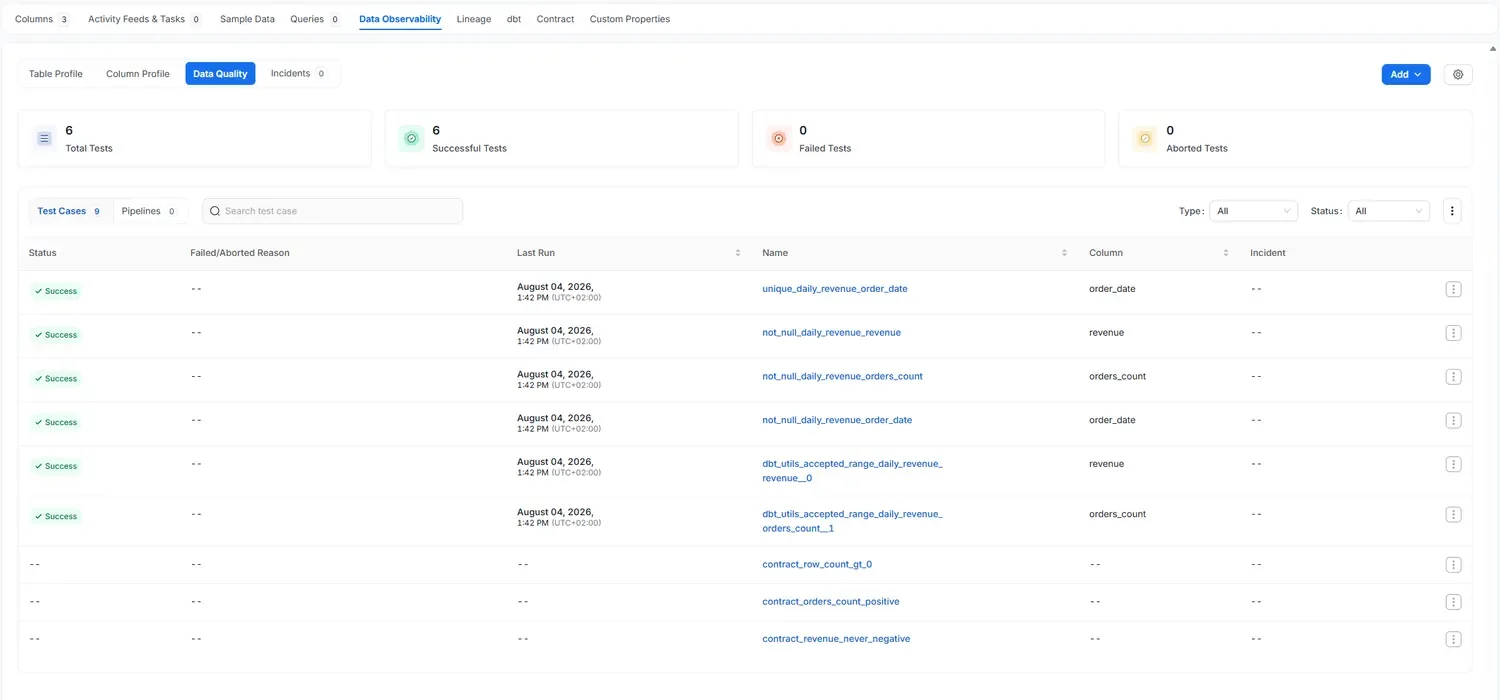
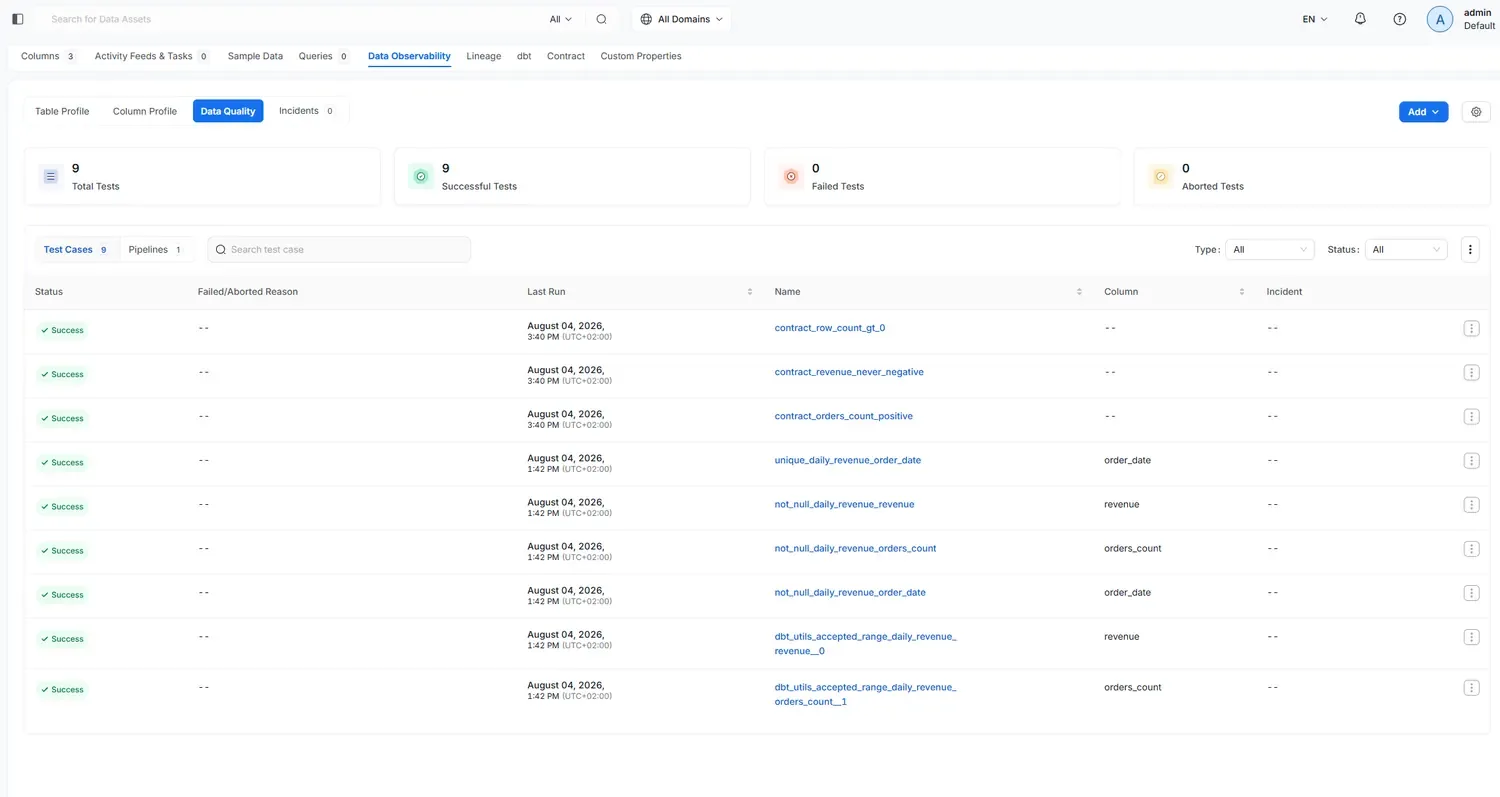
- See them. On the table page: Data Observability tab →
Data Quality sub-tab. You'll count 9 test cases: 6 dbt tests already green
(those results were synced from dbt by Lesson 2's ingestion — the librarian
reporting what the worker ran) and your 3
contract_*tests with no result yet: nothing in the catalog has executed them.
- Schedule them. Still under Data Quality, click the Pipelines sub-tab
(shows 0) → Add Pipeline. Name it (for example
dq test), leave the test-case selection on All, set the schedule (for example every day at 12:00 AM, after the nightly dbt build), and submit. You should see "has been created and deployed successfully". - Run it once now. Back on the Pipelines list, use the row's Run action, wait about a minute, refresh: Recent Runs: Success, Status: Active.
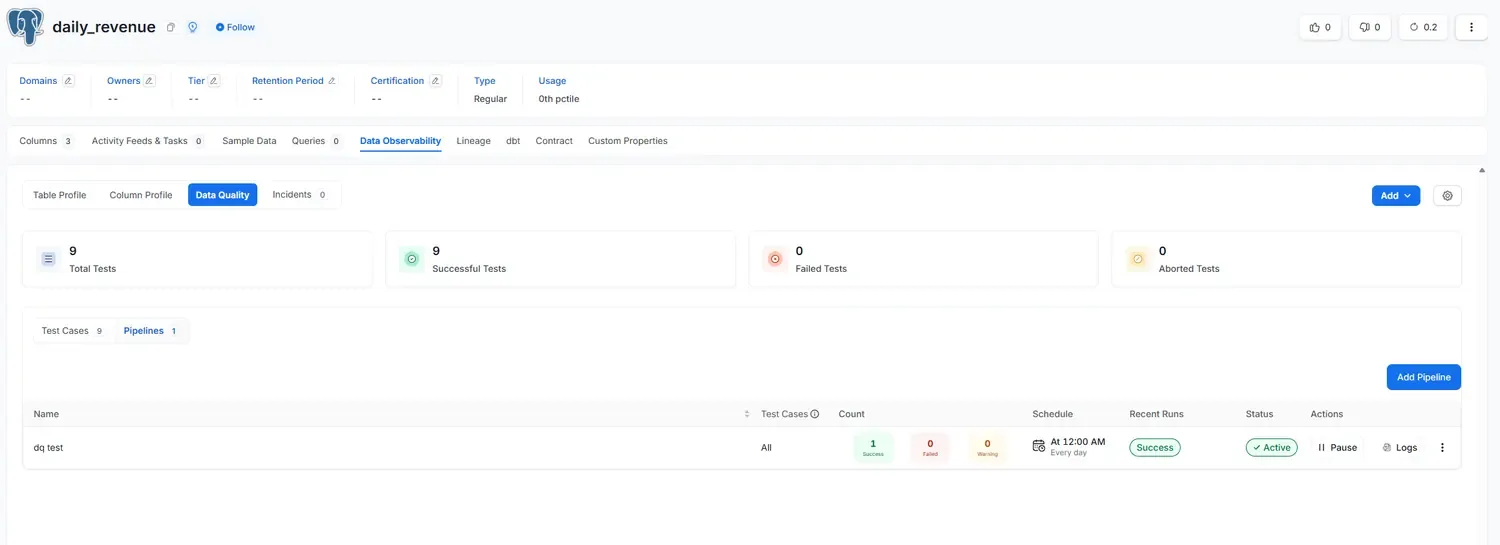
- Confirm. Switch back to Test Cases: 9 / 9 Successful, and the three
contract_*tests now carry their own Last Run timestamp — executed by the catalog, not by dbt. Every scheduled run appends to this history: the pass/fail and SLA reporting view CI cannot give you.
The same promise is now enforced at two moments: blocked in CI before merge (Layer 1) and audited on a schedule in the catalog (Layer 3) — with the honest caveat that the catalog's copy of the quality rules is maintained by script until the ODCS import defect is fixed.
A defect reported in March 2026 is worth knowing about. When an ODCS contract is
imported, the quality field can be stripped during schema synchronization, quietly
dropping your rules. Confirmed live in this lab on 1.12.6: the import kept description,
SLA and schema, and dropped all three quality rules without a word. Check your own version
after importing, and keep the source of truth in Git, enforced at the CI gate. Treat the
catalog as a consumer of the contract for monitoring, not as the master copy.
The full chain, end to end
ODCS contract   declared in YAML, versioned + reviewed in a PR
      │
   CI gate       check-jsonschema + dbt build + datacontract test   ← blocks any violation
      ▼
   dbt           builds + tests models, leaves manifest/catalog/run_results
      ▼
   OpenMetadata  ingests artifacts → lineage/docs/tests; imports ODCS → scheduled validation + SLA
dbt builds and transforms. OpenMetadata catalogs, connects and monitors. ODCS binds the producer to the consumer. The standard, though, is not the safeguard. The safeguard is the layer that checks the promise. One kind of contract lives in a file; the other lives in a layer that verifies, every day, that the promise still holds.
Checkpoint
quality field on import into OpenMetadata. The catalog is a
monitoring consumer, not the master copy.A contract that protects, not just reassures
You have given three tools a clear job each and built the layer that checks the promise. Now step back and look at what each one really does, where the standard stops and the organisation has to take over, and how much anyone can honestly claim to know about this yet.
Each tool does exactly one job
| Tool | Role | What it can't do |
|---|---|---|
| dbt | builds and transforms, and leaves manifest/catalog/run_results | only knows its own project, not who consumes the data or what SLA they expect |
| OpenMetadata | catalogs, connects lineage, and monitors on a schedule | only describes what already exists, so it is a mirror, not a promise |
| ODCS | binds producer to consumer: schema, quality, SLA and ownership | it is a file, so it cannot enforce itself |
| Enforcement | the CI gate plus scheduled catalog checks that block or flag breaks | only protects as far as the layer you actually wired up |
The standard is not the safeguard. The safeguard is the layer that checks the promise, and there are three places to put it: before (CI), during (streaming) or after (catalog on a schedule). For a warehouse team, the first and the third together are usually enough. A contract that only reassures lives in a file; a contract that protects lives in a layer that verifies, every day, that the promise still holds.
The verdict
Strengths
- Each layer has one job, and no tool pretends to do its neighbour's.
- An open standard (ODCS) keeps it portable, vendor-neutral and versioned in Git.
- Two contracts give you two safety nets: dbt guards the shape, ODCS guards the agreement.
- Failures are caught early, at the CI gate, before they reach real data.
- Layer 3 adds the history and SLA reporting the CI gate cannot provide.
Limitations
- Layer 1 only covers what goes through code, so a manual
UPDATEbypasses it. - The tooling is young: ODCS 3.1 arrived in December 2025, OpenMetadata's ODCS support in October 2025.
- The March 2026 import defect can silently strip the
qualityfield. - None of it means much without a named owner who is accountable when it breaks.
- Coverage is opt-in, so undocumented datasets stay ungoverned.
No one has five years of this
Keep your expectations grounded. ODCS 3.1.0 arrived in December 2025. OpenMetadata shipped contract enforcement in v1.9 (August 2025) and full ODCS support only in v1.10 (October 2025). The capability is measured in months, not years, so nobody has real tenure enforcing ODCS contracts in OpenMetadata. What does carry over is the judgment underneath the tools:
- Schema evolution: knowing which changes are safe, which break consumers, and how to version a breaking change without causing an incident.
- Quality gates: deciding what to test, where to test it, and which failures should block rather than warn. The rules matter more than the syntax.
- Ownership: negotiating the boundary between producers and consumers, and holding named owners to it. This is organisational work, not tooling.
Someone who can explain why a catalog holding a file is not the same as a contract being enforced understands more than someone who lists a tool they cannot have used for long. On this stack, weigh judgment over years served, because the years are not there yet for anyone.
Ownership, the change and breach processes, and the operating model that gives a contract its weight all sit beyond the tooling. That is the ground CDO Compass covers on DataEdgePro. Pair this hands-on lab with the framework: dataedgepro.net · CDO Compass.